


Get Latest Oct-2026 Real Professional-Machine-Learning-Engineer Exam Questions and Answers FREE
Truly Beneficial For Your Google Exam (Updated 350 Questions)
Google Professional Machine Learning Engineer certification exam is a great way for professionals to showcase their expertise in designing and developing machine learning models on Google Cloud Platform. Google Professional Machine Learning Engineer certification exam covers various topics related to machine learning, and passing the exam demonstrates the individual's ability to use Google Cloud Platform tools and services to create scalable and efficient machine learning models. Google Professional Machine Learning Engineer certification exam is a credible and recognized way for professionals to demonstrate their skills and knowledge in the field of machine learning.
Google Professional Machine Learning Engineer certification exam is intended for professionals who have experience in the field of machine learning, including data scientists, machine learning engineers, and software developers. Google Professional Machine Learning Engineer certification exam is designed to test the candidate's knowledge of advanced machine learning concepts, including deep learning, natural language processing, and computer vision.
NEW QUESTION # 71
You developed an ML model with Al Platform, and you want to move it to production. You serve a few thousand queries per second and are experiencing latency issues. Incoming requests are served by a load balancer that distributes them across multiple Kubeflow CPU-only pods running on Google Kubernetes Engine (GKE). Your goal is to improve the serving latency without changing the underlying infrastructure. What should you do?
- A. Switch to the tensorflow-model-server-universal version of TensorFlow Serving
- B. Significantly increase the max_enqueued_batches TensorFlow Serving parameter
- C. Recompile TensorFlow Serving using the source to support CPU-specific optimizations Instruct GKE to choose an appropriate baseline minimum CPU platform for serving nodes
- D. Significantly increase the max_batch_size TensorFlow Serving parameter
Answer: C
NEW QUESTION # 72
You are training models in Vertex Al by using data that spans across multiple Google Cloud Projects You need to find track, and compare the performance of the different versions of your models Which Google Cloud services should you include in your ML workflow?
- A. Dataplex. Vertex Al Feature Store and Vertex Al TensorBoard
- B. Vertex Al Pipelines, Vertex Al Feature Store, and Vertex Al Experiments
- C. Dataplex. Vertex Al Experiments, and Vertex Al ML Metadata
- D. Vertex Al Pipelines: Vertex Al Experiments and Vertex Al Metadata
Answer: B
Explanation:
Vertex AI Pipelines is a service that allows you to orchestrate and automate your machine learning (ML) workflows using pipelines1. A pipeline is a description of an ML workflow, including all of the components in the workflow, how the components are connected as a graph, and the runtime parameters that the pipeline accepts1. Vertex AI Pipelines helps you manage the end-to-end lifecycle of your ML projects, from data preprocessing to model deployment1.
Vertex AI Feature Store is a service that enables you to serve, share, and reuse ML features across different models and projects2. A feature is a measurable property or characteristic of an entity, such as the age of a person or the price of a product2. Vertex AI Feature Store helps you reduce data duplication, ensure data consistency, and improve model performance2.
Vertex AI Experiments is a service that helps you track and compare the performance of different versions of your models3. You can use Vertex AI Experiments to run multiple training jobs with different hyperparameters, architectures, or data sources, and then compare the results using metrics, visualizations, and reports3. Vertex AI Experiments helps you identify the best model for your use case and optimize your model performance3. Reference:
Vertex AI Pipelines | Google Cloud
Vertex AI Feature Store | Google Cloud
Vertex AI Experiments | Google Cloud
NEW QUESTION # 73
You work for a semiconductor manufacturing company. You need to create a real-time application that automates the quality control process High-definition images of each semiconductor are taken at the end of the assembly line in real time. The photos are uploaded to a Cloud Storage bucket along with tabular data that includes each semiconductor's batch number serial number dimensions, and weight You need to configure model training and serving while maximizing model accuracy. What should you do?
- A. Use Vertex Al Data Labeling Service to label the images and train an AutoML image classification model.
Deploy the model and configure Pub/Sub to publish a message when an image is categorized into the failing class. - B. Use Vertex Al Data Labeling Service to label the images and train an AutoML image classification model. Schedule a daily batch prediction job that publishes a Pub/Sub message when the job completes.
- C. Convert the images into an embedding representation Import this data into BigQuery, and train a BigQuery. ML K-means clustenng model with two clusters Deploy the model and configure Pub/Sub to publish a message when a semiconductor's data is categorized into the failing cluster.
- D. Import the tabular data into BigQuery use Vertex Al Data Labeling Service to label the data and train an AutoML tabular classification model Deploy the model and configure Pub/Sub to publish a message when a semiconductor's data is categorized into the failing class.
Answer: A
Explanation:
Vertex AI is a unified platform for building and managing machine learning solutions on Google Cloud. It provides various services and tools for different stages of the machine learning lifecycle, such as data preparation, model training, deployment, monitoring, and experimentation. Vertex AI Data Labeling Service is a service that allows you to create and manage human-labeled datasets for machine learning. You can use Vertex AI Data Labeling Service to label the images of semiconductors with binary labels, such as "pass" or
"fail", based on the quality criteria. You can also use Vertex AI AutoML Image Classification, which is a service that allows you to create and train custom image classification models without writing any code. You can use Vertex AI AutoML Image Classification to train an image classification model on the labeled images of semiconductors, and optimize the model for accuracy. You can also use Vertex AI to deploy the model to an endpoint, which is a service that allows you to serve online predictions from your model. You can configure Pub/Sub, which is a service that allows you to publish and subscribe to messages, to publish a message when an image is categorized into the failing class by the model. You can use the message to trigger an action, such as alerting the quality control team or stopping the production line. This solution can help you create a real-time application that automates the quality control process of semiconductors, and maximizes the model accuracy. References: The answer can be verified from official Google Clouddocumentation and resources related to Vertex AI, Vertex AI Data Labeling Service, Vertex AI AutoML Image Classification, and Pub/Sub.
* Vertex AI | Google Cloud
* Vertex AI Data Labeling Service | Google Cloud
* Vertex AI AutoML Image Classification | Google Cloud
* Pub/Sub | Google Cloud
NEW QUESTION # 74
You want to migrate a scikrt-learn classifier model to TensorFlow. You plan to train the TensorFlow classifier model using the same training set that was used to train the scikit-learn model and then compare the performances using a common test set. You want to use the Vertex Al Python SDK to manually log the evaluation metrics of each model and compare them based on their F1 scores and confusion matrices. How should you log the metrics?
- A.

- B.

- C.

- D.

Answer: B
Explanation:
To log the metrics of a machine learning model in TensorFlow using the Vertex AI Python SDK, you should utilize the aiplatform.log_metrics function to log the F1 score and aiplatform.
log_classification_metrics function to log the confusion matrix. These functions allow users to manually record and store evaluation metrics for each model, facilitating an efficient comparison based on specific performance indicators like F1 scores and confusion matrices. References : The answer can be verified from official Google Cloud documentation and resources related to Vertex AI and TensorFlow.
* Vertex AI Python SDK reference | Google Cloud
* Logging custom metrics | Vertex AI
* Migrating from scikit-learn to TensorFlow | TensorFlow
NEW QUESTION # 75
You are training an LSTM-based model on Al Platform to summarize text using the following job submission script: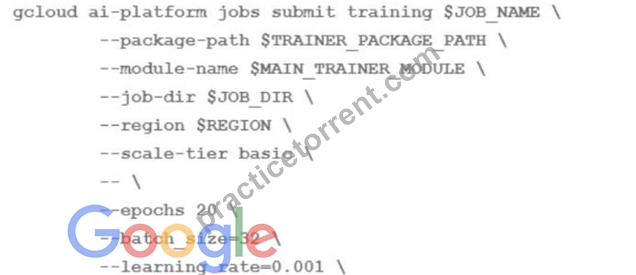
You want to ensure that training time is minimized without significantly compromising the accuracy of your model. What should you do?
- A. Modify the batch size' parameter
- B. Modify the 'scale-tier' parameter
- C. Modify the 'epochs' parameter
- D. Modify the 'learning rate' parameter
Answer: A
NEW QUESTION # 76
You are training an ML model using data stored in BigQuery that contains several values that are considered Personally Identifiable Information (Pll). You need to reduce the sensitivity of the dataset before training your model. Every column is critical to your model. How should you proceed?
- A. Before training, use BigQuery to select only the columns that do not contain sensitive data Create an authorized view of the data so that sensitive values cannot be accessed by unauthorized individuals.
- B. Use the Cloud Data Loss Prevention (DLP) API to scan for sensitive data, and use Dataflow with the DLP API to encrypt sensitive values with Format Preserving Encryption
- C. Using Dataflow, ingest the columns with sensitive data from BigQuery, and then randomize the values in each sensitive column.
- D. Use the Cloud Data Loss Prevention (DLP) API to scan for sensitive data, and use Dataflow to replace all sensitive data by using the encryption algorithm AES-256 with a salt.
Answer: B
Explanation:
The best option for reducing the sensitivity of the dataset before training the model is to use the Cloud Data Loss Prevention (DLP) API to scan for sensitive data, and use Dataflow with the DLP API to encrypt sensitive values with Format Preserving Encryption. This option allows you to keep every column in the dataset, while protecting the sensitive data from unauthorized access or exposure. The Cloud DLP API can detect and classify various types of sensitive data, such as names, email addresses, phone numbers, credit card numbers, and more1. Dataflow can create scalable and reliable pipelines to process large volumes of data from BigQuery and other sources2. Format Preserving Encryption (FPE) is a technique that encrypts sensitive data while preserving its original format and length, which can help maintain the utility and validity of the data3.
By using Dataflow with the DLP API, you can apply FPE to the sensitive values in the dataset, and store the encrypted data in BigQuery or another destination. You can also use the same pipeline to decrypt the data when needed, by using the same encryption key and method4.
The other options are not as suitable as option B, for the following reasons:
* Option A: Using Dataflow to ingest the columns with sensitive data from BigQuery, and then randomize the values in each sensitive column, would reduce the sensitivity of the data, but also the utility and accuracy of the data. Randomization is a technique that replaces sensitive data with random values, which can prevent re-identification of the data, but also distort the distribution and relationships of the data3. This can affect the performance and quality of the ML model, especially if every column is critical to the model.
* Option C: Using the Cloud DLP API to scan for sensitive data, and use Dataflow to replace all sensitive data by using the encryption algorithm AES-256 with a salt, would reduce the sensitivity of the data, but also the utility and validity of the data. AES-256 is a symmetric encryption algorithm that uses a 256-bit key to encrypt and decrypt data. A salt is a random value that is added to the data before encryption, to increase the randomness and security of the encrypted data. However, AES-256 does not preserve the format or length of the original data, which can cause problems when storing or processing the data. For example, if the original data is a 10-digit phone number, AES-256 would produce a much longer and different string, which can break the schema or logic of the dataset3.
* Option D: Before training, using BigQuery to select only the columns that do not contain sensitive data, and creating an authorized view of the data so that sensitive values cannot be accessed by unauthorized individuals, would reduce the exposure of the sensitive data, but also the completeness and relevance of the data. An authorized view is a BigQuery view that allows you to share query results with particular users or groups, without giving them access to the underlying tables. However, this option assumes that you can identify the columns that do not contain sensitive data, which may not be easy or accurate.
Moreover, this option would remove some columns from the dataset, which can affect the performance and quality of the ML model, especially if every column is critical to the model.
References:
* Preparing for Google Cloud Certification: Machine Learning Engineer, Course 5: Responsible AI, Week
2: Privacy
* Google Cloud Professional Machine Learning Engineer Exam Guide, Section 5: Developing responsible AI solutions, 5.2 Implementing privacy techniques
* Official Google Cloud Certified Professional Machine Learning Engineer Study Guide, Chapter 9:
Responsible AI, Section 9.4: Privacy
* De-identification techniques
* Cloud Data Loss Prevention (DLP) API
* Dataflow
* Using Dataflow and Sensitive Data Protection to securely tokenize and import data from a relational database to BigQuery
* [AES encryption]
* [Salt (cryptography)]
* [Authorized views]
NEW QUESTION # 77
You work at a gaming startup that has several terabytes of structured data in Cloud Storage. This data includes gameplay time data, user metadata, and game metadata. You want to build a model that recommends new games to users that requires the least amount of coding. What should you do?
- A. Read data to a Vertex Al Workbench notebook. Use TensorFlow to train a matrix factorization model.
- B. Load the data in BigQuery. Use BigQuery ML to train an Autoencoder model.
- C. Read data to a Vertex Al Workbench notebook. Use TensorFlow to train a two-tower model.
- D. Load the data in BigQuery. Use BigQuery ML to train a matrix factorization model.
Answer: D
Explanation:
The best option to build a game recommendation model with the least amount of coding is to use BigQuery ML, which allows you to create and execute machine learning models using standard SQL queries. BigQuery ML supports several types of models, including matrix factorization, which is a common technique for collaborative filtering-based recommendation systems. Matrix factorization models learn latent factors for users and items from the observed ratings, and then use them to predict the ratings for new user-item pairs.
BigQuery ML provides a built-in function called ML.RECOMMEND that can generate recommendations for a given user based on a trained matrix factorization model. To use BigQuery ML, you need to load the data in BigQuery, which is a serverless, scalable, and cost-effective data warehouse. You can use the bq command- line tool, the BigQuery API, or the Cloud Console to load data from Cloud Storage to BigQuery.
Alternatively, you can use federated queries to query data directly from Cloud Storage without loading it to BigQuery, but this may incur additional costs and performance overhead. Option A is incorrect because BigQuery ML does not support Autoencoder models, which are a type of neural network that can learn compressed representations of the input data. Autoencoder models are not suitable for recommendation systems, as they do not capture the interactions between users and items. Option C is incorrect because using TensorFlow to train a two-tower model requires more coding than using BigQuery ML. A two-tower model is a type of neural network that learns embeddings for users and items separately, and then combines them with a dot product or a cosine similarity to compute the rating. TensorFlow is a low-level framework that requires you to define the model architecture, the loss function, the optimizer, the training loop, and the evaluation metrics. Moreover, you need to read the data from Cloud Storage to a Vertex AI Workbench notebook, which is an instance of JupyterLab that runs on a Google Cloud virtual machine. This may involve additional steps such as authentication, authorization, and data preprocessing. Option D is incorrect because using TensorFlow to train a matrix factorization model also requires more coding than using BigQuery ML. Although TensorFlow provides some high-level APIs such as Keras and TensorFlow Recommenders that can simplify the model development, you still need to handle the data loading and the model training and evaluation yourself. Furthermore, you need to read the data from Cloud Storage to a Vertex AI Workbench notebook, which may incur additional complexity and costs. References:
* BigQuery ML documentation
* Using matrix factorization with BigQuery ML
* Recommendations AI documentation
* Loading data into BigQuery
* Querying data in Cloud Storage from BigQuery
* Vertex AI Workbench documentation
* TensorFlow documentation
* TensorFlow Recommenders documentation
NEW QUESTION # 78
You work at a large organization that recently decided to move their ML and data workloads to Google Cloud. The data engineering team has exported the structured data to a Cloud Storage bucket in Avro format. You need to propose a workflow that performs analytics, creates features, and hosts the features that your ML models use for online prediction How should you configure the pipeline?
- A. Ingest the Avro files into BigQuery to perform analytics Use a Dataflow pipeline to create the features, and store them in Vertex Al Feature Store for online prediction.
- B. Ingest the Avro files into Cloud Spanner to perform analytics Use a Dataflow pipeline to create the features and store them in BigQuery for online prediction.
- C. Ingest the Avro files into BigQuery to perform analytics Use BigQuery SQL to create features and store them in a separate BigQuery table for online prediction.
- D. Ingest the Avro files into Cloud Spanner to perform analytics. Use a Dataflow pipeline to create the features. and store them in Vertex Al Feature Store for online prediction.
Answer: A
Explanation:
BigQuery is a service that allows you to store and query large amounts of data in a scalable and cost-effective way. You can use BigQuery to ingest the Avro files from the Cloud Storage bucket and perform analytics on the structured data. Avro is a binary file format that can store complex data types and schemas. You can use the bq load command or the BigQuery API to load the Avro files into a BigQuery table. You can then use SQL queries to analyze the data and generate insights. Dataflow is a service that allows you to create and run scalable and portable data processing pipelines on Google Cloud. You can use Dataflow to create the features for your ML models, such as transforming, aggregating, and encoding the data. You can use the Apache Beam SDK to write your Dataflow pipeline code in Python or Java. You can also use the built-in transforms or custom transforms to apply the feature engineering logic to your data. Vertex AI Feature Store is a service that allows you to store and manage your ML features on Google Cloud. You can use Vertex AI Feature Store to host the features that your ML models use for online prediction. Online prediction is a type of prediction that provides low-latency responses to individual or small batches of input data. You can use the Vertex AI Feature Store API to write the features from your Dataflow pipeline to a feature store entity type. You can then use the Vertex AI Feature Store online serving API to read the features from the feature store and pass them to your ML models for online prediction. By using BigQuery, Dataflow, and Vertex AI Feature Store, you can configure a pipeline that performs analytics, creates features, and hosts the features that your ML models use for online prediction. Reference:
BigQuery documentation
Dataflow documentation
Vertex AI Feature Store documentation
Preparing for Google Cloud Certification: Machine Learning Engineer Professional Certificate
NEW QUESTION # 79
Your organization's call center has asked you to develop a model that analyzes customer sentiments in each call. The call center receives over one million calls daily, and data is stored in Cloud Storage. The data collected must not leave the region in which the call originated, and no Personally Identifiable Information (Pll) can be stored or analyzed. The data science team has a third-party tool for visualization and access which requires a SQL ANSI-2011 compliant interface. You need to select components for data processing and for analytics. How should the data pipeline be designed?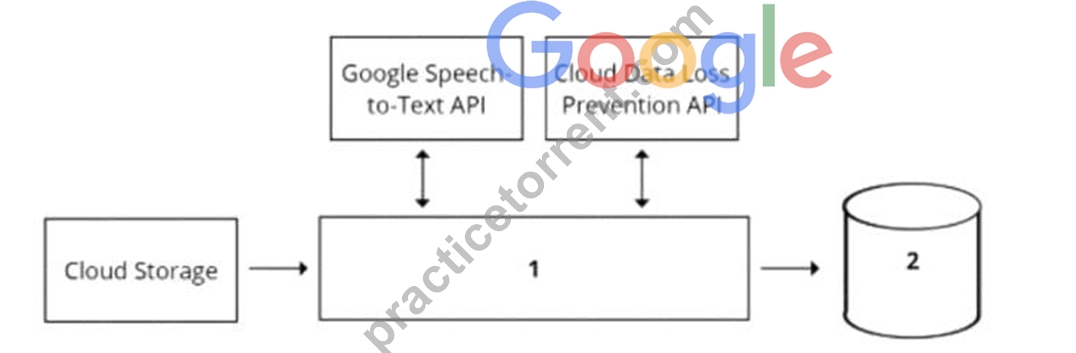
- A. 1 = Dataflow, 2 = Cloud SQL
- B. 1 = Pub/Sub, 2 = Datastore
- C. 1 = Cloud Function, 2 = Cloud SQL
- D. 1 = Dataflow, 2 = BigQuery
Answer: D
Explanation:
A data pipeline is a set of steps or processes that move data from one or more sources to one or more destinations, usually for the purpose of analysis, transformation, or storage. A data pipeline can be designed using various components, such as data sources, data processing tools, data storage systems, and data analytics tools1 To design a data pipeline for analyzing customer sentiments in each call, one should consider the following requirements and constraints:
* The call center receives over one million calls daily, and data is stored in Cloud Storage. This implies that the data is large, unstructured, and distributed, and requires a scalable and efficient data processing tool that can handle various types of data formats, such as audio, text, or image.
* The data collected must not leave the region in which the call originated, and no Personally Identifiable Information (Pll) can be stored or analyzed. This implies that the data is sensitive and subject to data privacy and compliance regulations, and requires a secure and reliable data storage system that can enforce data encryption, access control, and regional policies.
* The data science team has a third-party tool for visualization and access which requires a SQL ANSI-2011 compliant interface. This implies that the data analytics tool is external and independent of the data pipeline, and requires a standard and compatible data interface that can support SQL queries and operations.
One of the best options for selecting components for data processing and for analytics is to use Dataflow for data processing and BigQuery for analytics. Dataflow is a fully managed service for executing Apache Beam pipelines for data processing, such as batch or stream processing, extract-transform-load (ETL), or data integration. BigQuery is a serverless, scalable, and cost-effective data warehouse that allows you to run fast and complex queries on large-scale data23 Using Dataflow and BigQuery has several advantages for this use case:
* Dataflow can process large and unstructured data from Cloud Storage in a parallel and distributed manner, and apply various transformations, such as converting audio to text, extracting sentiment scores, or anonymizing PII. Dataflow can also handle both batch and stream processing, which can enable real-time or near-real-time analysis of the call data.
* BigQuery can store and analyze the processed data from Dataflow in a secure and reliable way, and enforce data encryption, access control, and regional policies. BigQuery can also support SQL
* ANSI-2011 compliant interface, which can enable the data science team to use their third-party tool for visualization and access. BigQuery can also integrate with various Google Cloud services and tools, such as AI Platform, Data Studio, or Looker.
* Dataflow and BigQuery can work seamlessly together, as they are both part of the Google Cloud ecosystem, and support various data formats, such as CSV, JSON, Avro, or Parquet. Dataflow and BigQuery can also leverage the benefits of Google Cloud infrastructure, such as scalability, performance, and cost-effectiveness.
The other options are not as suitable or feasible. Using Pub/Sub for data processing and Datastore for analytics is not ideal, as Pub/Sub is mainly designed for event-driven and asynchronous messaging, not data processing, and Datastore is mainly designed for low-latency and high-throughput key-value operations, not analytics.
Using Cloud Function for data processing and Cloud SQL for analytics is not optimal, as Cloud Function has limitations on the memory, CPU, and execution time, and does not support complex data processing, and Cloud SQL is a relational database service that may not scale well for large-scale data. Using Cloud Composer for data processing and Cloud SQL for analytics is not relevant, as Cloud Composer is mainly designed for orchestrating complex workflows across multiple systems, not data processing, and Cloud SQL is a relational database service that may not scale well for large-scale data.
References: 1: Data pipeline 2: Dataflow overview 3: BigQuery overview : [Dataflow documentation] :
[BigQuery documentation]
NEW QUESTION # 80
You need to design an architecture that serves asynchronous predictions to determine whether a particular mission-critical machine part will fail. Your system collects data from multiple sensors from the machine. You want to build a model that will predict a failure in the next N minutes, given the average of each sensor's data from the past 12 hours. How should you design the architecture?
- A. 1. Events are sent by the sensors to Pub/Sub, consumed in real time, and processed by a Dataflow stream processing pipeline.
2. The pipeline invokes the model for prediction and sends the predictions to another Pub/Sub topic.
3. Pub/Sub messages containing predictions are then consumed by a downstream system for monitoring. - B. 1. Export your data to Cloud Storage using Dataflow.
2. Submit a Vertex AI batch prediction job that uses your trained model in Cloud Storage to perform scoring on the preprocessed data.
3. Export the batch prediction job outputs from Cloud Storage and import them into Cloud SQL. - C. 1. Export the data to Cloud Storage using the BigQuery command-line tool
2. Submit a Vertex AI batch prediction job that uses your trained model in Cloud Storage to perform scoring on the preprocessed data.
3. Export the batch prediction job outputs from Cloud Storage and import them into BigQuery. - D. 1. HTTP requests are sent by the sensors to your ML model, which is deployed as a microservice and exposes a REST API for prediction
2. Your application queries a Vertex AI endpoint where you deployed your model.
3. Responses are received by the caller application as soon as the model produces the prediction.
Answer: A
Explanation:
* Reasoning: The question asks for a design that serves asynchronous predictions to determine whether a machine part will fail. This means that the predictions do not need to be returned immediately to the sensors, but can be processed in batches and sent to a downstream system for monitoring. Option B is the only one that uses a streaming data pipeline with Pub/Sub and Dataflow, which can handle real-time data ingestion, processing, and prediction. Option B also invokes the model for prediction, which is required by the question. The other options either use synchronous predictions (option A), batch predictions (options C and D), or do not invoke the model for prediction (option D).
* References: You can learn more about the differences between synchronous, asynchronous, and batch predictions in Vertex AI from this document. You can also find examples of how to use Pub/Sub and Dataflow for streaming data pipelines from this tutorial and this codelab.
NEW QUESTION # 81
You work at a subscription-based company. You have trained an ensemble of trees and neural networks to predict customer churn, which is the likelihood that customers will not renew their yearly subscription. The average prediction is a 15% churn rate, but for a particular customer the model predicts that they are 70% likely to churn. The customer has a product usage history of 30%, is located in New York City, and became a customer in 1997. You need to explain the difference between the actual prediction, a 70% churn rate, and the average prediction. You want to use Vertex Explainable AI. What should you do?
- A. Measure the effect of each feature as the weight of the feature multiplied by the feature value.
- B. Train local surrogate models to explain individual predictions.
- C. Configure sampled Shapley explanations on Vertex Explainable AI.
- D. Configure integrated gradients explanations on Vertex Explainable AI.
Answer: C
Explanation:
* Option A is incorrect because training local surrogate models to explain individual predictions is not a feature of Vertex Explainable AI, but rather a general technique for interpreting black-box models. Local surrogate models are simpler models that approximate the behavior of the original model around a specific input1.
* Option B is correct because configuring sampled Shapley explanations on Vertex Explainable AI is a way to explain the difference between the actual prediction and the average prediction for a given
* input. Sampled Shapley explanations are based on the Shapley value, which is a game-theoretic concept that measures how much each feature contributes to the prediction2. Vertex Explainable AI supports sampled Shapley explanations for tabular data, such as customer churn3.
* Option C is incorrect because configuring integrated gradients explanations on Vertex Explainable AI is not suitable for explaining the difference between the actual prediction and the average prediction for a given input. Integrated gradients explanations are based on the idea of computing the gradients of the prediction with respect to the input features along a path from a baseline input to the actual input4. Vertex Explainable AI supports integrated gradients explanations for image and text data, but not for tabular data3.
* Option D is incorrect because measuring the effect of each feature as the weight of the feature multiplied by the feature value is not a valid way to explain the difference between the actual prediction and the average prediction for a given input. This method assumes that the model is linear and additive, which is not the case for an ensemble of trees and neural networks. Moreover, this method does not account for the interactions between features or the non-linearity of the model5.
References:
* Local surrogate models
* Shapley value
* Vertex Explainable AI overview
* Integrated gradients
* Feature importance
NEW QUESTION # 82
You received a training-serving skew alert from a Vertex Al Model Monitoring job running in production.
You retrained the model with more recent training data, and deployed it back to the Vertex Al endpoint but you are still receiving the same alert. What should you do?
- A. Update the model monitoring job to use the more recent training data that was used to retrain the model.
- B. Update the model monitoring job to use a lower sampling rate.
- C. Temporarily disable the alert until the model can be retrained again on newer training data Retrain the model again after a sufficient amount of new production traffic has passed through the Vertex Al endpoint
- D. Temporarily disable the alert Enable the alert again after a sufficient amount of new production traffic has passed through the Vertex Al endpoint.
Answer: A
Explanation:
The best option for resolving the training-serving skew alert is to update the model monitoring job to use the more recent training data that was used to retrain the model. This option can help align the baseline distribution of the model monitoring job with the current distribution of the production data, and eliminate the false positive alerts. Model Monitoring is a service that can track and compare the results of multiple machine learning runs. Model Monitoring can monitor the model's prediction input data for feature skew and drift.
Training-serving skew occurs when the feature data distribution in production deviates from the feature data distribution used to train the model. If the original training data is available, you can enable skew detection to monitor your models for training-serving skew. Model Monitoring uses TensorFlow Data Validation (TFDV) to calculate the distributions and distance scores for each feature, and compares them with a baseline distribution. The baseline distribution is the statistical distribution of the feature's values in the training data. If the distance score for a feature exceeds an alerting threshold that you set, Model Monitoring sends you an email alert. However, if you retrain the model with more recent training data, and deploy it back to the Vertex AI endpoint, the baseline distribution of the model monitoring job may become outdated and inconsistent with the current distribution of the production data. This can cause the model monitoring job to generate false positive alerts, even if the model performance is not deteriorated. To avoid this problem, you need to update the model monitoring job to use the more recent training data that was used to retrain the model. This can help the model monitoring job to recalculate the baseline distribution and the distance scores, and compare them with the current distribution of the production data. This can also help the model monitoring job to detect any true positive alerts, such as a sudden change in the production data that causes the model performance to degrade1.
The other options are not as good as option B, for the following reasons:
* Option A: Updating the model monitoring job to use a lower sampling rate would not resolve the training-serving skew alert, and could reduce the accuracy and reliability of the model monitoring job.
The sampling rate is a parameter that determines the percentage of prediction requests that are logged and analyzed by the model monitoring job. Using a lower sampling rate can reduce the storage and computation costs of the model monitoring job, but also the quality and validity of the data. Using a lower sampling rate can introduce sampling bias and noise into the data, and make the model monitoring job miss some important features or patterns of the data. Moreover, using a lower sampling rate would not address the root cause of the training-serving skew alert, which is the mismatch between the baseline distribution and the current distribution of the production data2.
* Option C: Temporarily disabling the alert, and enabling the alert again after a sufficient amount of new production traffic has passed through the Vertex AI endpoint, would not resolve the training-serving skew alert, and could expose the model to potential risks and errors. Disabling the alert would stop the model monitoring job from sending email notifications when the distance score for a feature exceeds the alerting threshold, but it would not stop the model monitoring job from calculating and comparing the distributions and distance scores. Therefore, disabling the alert would not address the root cause of the training-serving skew alert, which is the mismatch between the baseline distribution and the current distribution of the production data. Moreover, disabling the alert would prevent the model monitoring job from detecting any true positive alerts, such as a sudden change in the production data that causes the model performance to degrade. This can expose the model to potential risks and errors, and affect the user satisfaction and trust1.
* Option D: Temporarily disabling the alert until the model can be retrained again on newer training data, and retraining the model again after a sufficient amount of new production traffic has passed through the Vertex AI endpoint, would not resolve the training-serving skew alert, and could cause unnecessary costs and efforts. Disabling the alert would stop the model monitoring job from sending email notifications when the distance score for a feature exceeds the alerting threshold, but it would not stop the model monitoring job from calculating and comparing the distributions and distance scores.
Therefore, disabling the alert would not address the root cause of the training-serving skew alert, which is the mismatch between the baseline distribution and the current distribution of the production data.
Moreover, disabling the alert would prevent the model monitoring job from detecting any true positive alerts, such as a sudden change in the production data that causes the model performance to degrade.
This can expose the model to potential risks and errors, and affect the user satisfaction and trust.
Retraining the model again on newer training data would create a new model version, but it would not
* update the model monitoring job to use the newer training data as the baseline distribution. Therefore, retraining the model again on newer training data would not resolve the training-serving skew alert, and could cause unnecessary costs and efforts1.
References:
* Preparing for Google Cloud Certification: Machine Learning Engineer, Course 3: Production ML Systems, Week 4: Evaluation
* Google Cloud Professional Machine Learning Engineer Exam Guide, Section 3: Scaling ML models in production, 3.3 Monitoring ML models in production
* Official Google Cloud Certified Professional Machine Learning Engineer Study Guide, Chapter 6:
Production ML Systems, Section 6.3: Monitoring ML Models
* Using Model Monitoring
* Understanding the score threshold slider
* Sampling rate
NEW QUESTION # 83
You have been asked to develop an input pipeline for an ML training model that processes images from disparate sources at a low latency. You discover that your input data does not fit in memory. How should you create a dataset following Google-recommended best practices?
- A. Convert the images to tf .Tensor Objects, and then run Dataset. from_tensor_slices{).
- B. Convert the images Into TFRecords, store the images in Cloud Storage, and then use the tf. data API to read the images for training
- C. Create a tf.data.Dataset.prefetch transformation
- D. Convert the images to tf .Tensor Objects, and then run tf. data. Dataset. from_tensors ().
Answer: B
NEW QUESTION # 84
You received a training-serving skew alert from a Vertex AI Model Monitoring job running in production. You retrained the model with more recent training data, and deployed it back to the Vertex AI endpoint, but you are still receiving the same alert. What should you do?
- A. Update the model monitoring job to use the more recent training data that was used to retrain the model.
- B. Temporarily disable the alert. Enable the alert again after a sufficient amount of new production traffic has passed through the Vertex AI endpoint.
- C. Temporarily disable the alert until the model can be retrained again on newer training data.
Retrain the model again after a sufficient amount of new production traffic has passed through the Vertex AI endpoint. - D. Update the model monitoring job to use a lower sampling rate.
Answer: A
NEW QUESTION # 85
You have trained a deep neural network model on Google Cloud. The model has low loss on the training data, but is performing worse on the validation data. You want the model to be resilient to overfitting. Which strategy should you use when retraining the model?
- A. Apply a dropout parameter of 0 2, and decrease the learning rate by a factor of 10
- B. Run a hyperparameter tuning job on Al Platform to optimize for the learning rate, and increase the number of neurons by a factor of 2.
- C. Run a hyperparameter tuning job on Al Platform to optimize for the L2 regularization and dropout parameters
- D. Apply a L2 regularization parameter of 0.4, and decrease the learning rate by a factor of 10.
Answer: C
Explanation:
Overfitting occurs when a model tries to fit the training data so closely that it does not generalize well to new data. Overfitting can be caused by having a model that is too complex for the data, such as having too many parameters or layers. Overfitting can lead to poor performance on the validation data, which reflects how the model will perform on unseen data 1 To prevent overfitting, one strategy is to use regularization techniques that penalize the complexity of the model and encourage it to learn simpler patterns. Two common regularization techniques for deep neural networks are L2 regularization and dropout. L2 regularization adds a term to the loss function that is proportional to the squared magnitude of the model's weights. This term penalizes large weights and encourages the model to use smaller weights. Dropout randomly drops out some units in the network during training, which prevents co-adaptation of features and reduces the effec tive number of parameters. Both L2 regularization and dropout have hyperparameters that control the strength of the regularization effect 2 3 Another strategy to prevent overfitting is to use hyperparameter tuning, which is the process of finding the optimal values for the parameters of the model that affect its performance. Hyperparameter tuning can help find the best combination of hyperparameters that minimize the validation loss and improve the generalization ability of the model. AI Platform provides a service for hyperparameter tuning that can run multiple trials in parallel and use different search algorithms to find the best solution.
Therefore, the best strategy to use when retraining the model is to run a hyperparameter tuning job on AI Platform to optimize for the L2 regularization and dropout parameters. This will allow the model to find the optimal balance between fitting the training data and generalizing to new data. The other options are not as effective, as they either use fixed values for the regularization parameters, which may not be optimal, or they do not address the issue of overfitting at all.
rences: 1 : Generalization: Peril of Overfitting 2 : Regularization for Deep Learning 3 : Dropout: A Simple Way to Prevent Neural Networks from Overfitting : [Hyperparameter tuning overview]
NEW QUESTION # 86
You built a custom Vertex AI pipeline job that preprocesses images and trains an object detection model. The pipeline currently uses 1 n1-standard-8 machine with 1 NVIDIA Tesla V100 GPU. You want to reduce the model training time without compromising model accuracy. What should you do?
- A. Update the WorkerPoolSpec to use a machine with 24 vCPUs and 1 NVIDIA Tesla V100 GPU.
- B. Train the same model on a stratified subset of your dataset.
- C. Update the WorkerPoolSpec to use a machine with 24 vCPUs and 3 NVIDIA Tesla V100 GPUs.
- D. Reduce the number of layers in your object detection model.
Answer: C
Explanation:
To reduce training time without sacrificing accuracy, you must scale your hardware resources rather than reducing the complexity of the model or the size of the data.
* Vertical and Horizontal Scaling: In Vertex AI Custom Training, the WorkerPoolSpec allows you to define the hardware for your cluster. By increasing the number of GPUs (from 1 to 3) and CPUs (from
8 to 24), you enable faster parallel processing of image data and faster gradient updates during backpropagation.
* Why other options are incorrect:
* Options A and B: Reducing layers or using a subset of the data directly compromises the model ' s ability to learn complex patterns, leading to lower accuracy.
* Option C: Increasing only the vCPUs might help if your bottleneck is image preprocessing (CPU-bound), but for object detection, the training bottleneck is almost always the GPU. Adding more GPUs (as in Option D) provides the most significant reduction in training time.
NEW QUESTION # 87
A Machine Learning Specialist is preparing data for training on Amazon SageMaker. The Specialist is using one of the SageMaker built-in algorithms for the training. The dataset is stored in .CSV format and is transformed into a numpy.array, which appears to be negatively affecting the speed of the training.
What should the Specialist do to optimize the data for training on SageMaker?
- A. Use the SageMaker batch transform feature to transform the training data into a DataFrame.
- B. Transform the dataset into the RecordIO protobufformat.
- C. Use AWS Glue to compress the data into the Apache Parquet format.
- D. Use the SageMaker hyperparameter optimization feature to automatically optimize the data.
Answer: B
NEW QUESTION # 88
You have been asked to productionize a proof-of-concept ML model built using Keras. The model was trained in a Jupyter notebook on a data scientist's local machine. The notebook contains a cell that performs data validation and a cell that performs model analysis. You need to orchestrate the steps contained in the notebook and automate the execution of these steps for weekly retraining. You expect much more training data in the future. You want your solution to take advantage of managed services while minimizing cost.
What should you do?
- A. Write the code as a TensorFlow Extended (TFX) pipeline orchestrated with Vertex AI Pipelines. Use standard TFX components for data validation and model analysis, and use Vertex AI Pipelines for model retraining.
- B. Rewrite the steps in the Jupyter notebook as an Apache Spark job, and schedule the execution of the job on ephemeral Dataproc clusters using Cloud Scheduler.
- C. Move the Jupyter notebook to a Notebooks instance on the largest N2 machine type, and schedule the execution of the steps in the Notebooks instance using Cloud Scheduler.
- D. Extract the steps contained in the Jupyter notebook as Python scripts, wrap each script in an Apache Airflow BashOperator, and run the resulting directed acyclic graph (DAG) in Cloud Composer.
Answer: A
Explanation:
The best option for productionizing a Keras model is to use TensorFlow Extended (TFX), a framework for building end-to-end machine learning pipelines that can handle large-scale data and complex workflows. TFX provides standard components for data ingestion, transformation, validation, analysis, training, tuning, serving, and monitoring. TFX pipelines can be orchestrated with Vertex AI Pipelines, a managed service that runs on Google Cloud Platform and leverages Kubernetes and Argo. Vertex AI Pipelines allows you to automate the execution of your TFX pipeline steps, schedule retraining jobs, and scale up or down the resources as needed. By using TFX and Vertex AI Pipelines, you can take advantage of the following benefits:
* You can reuse the existing code in your Jupyter notebook, as TFX supports Keras as a first-class citizen. You can also use the Keras Tuner to optimize your model hyperparameters.
* You can ensure data quality and consistency by using the TFX Data Validation component, which can detect anomalies, drift, and skew in your data. You can also use the TFX SchemaGen component to generate a schema for your data and enforce it throughout the pipeline.
* You can analyze your model performance and fairness by using the TFX Model Analysis component, which can produce various metrics and visualizations. You can also use the TFX Model Validation component to compare your new model with a baseline model and set thresholds for deploying the model to production.
* You can deploy your model to various serving platforms by using the TFX Pusher component, which can push your model to Vertex AI, Cloud AI Platform, TensorFlow Serving, or TensorFlow Lite. You can also use the TFX Model Registry to manage the versions and metadata of your models.
* You can monitor your model performance and health by using the TFX Model Monitor component, which can detect data drift, concept drift, and prediction skew in your model. You can also use the TFX Evaluator component to compute metrics and validate your model against a baseline or a slice of data.
* You can reduce the cost and complexity of managing your own infrastructure by using Vertex AI Pipelines, which provides a serverless environment for running your TFX pipeline. You can also use the Vertex AI Experiments and Vertex AI TensorBoard to track and visualize your pipeline runs.
References:
* [TensorFlow Extended (TFX)]
* [Vertex AI Pipelines]
* [TFX User Guide]
NEW QUESTION # 89
You work for a retailer that sells clothes to customers around the world. You have been tasked with ensuring that ML models are built in a secure manner. Specifically, you need to protect sensitive customer data that might be used in the models. You have identified four fields containing sensitive data that are being used by your data science team: AGE, IS_EXISTING_CUSTOMER, LATITUDE_LONGITUDE, and SHIRT_SIZE. What should you do with the data before it is made available to the data science team for training purposes?
- A. Tokenize all of the fields using hashed dummy values to replace the real values.
- B. Remove all sensitive data fields, and ask the data science team to build their models using non- sensitive data.
- C. Coarsen the data by putting AGE into quantiles and rounding LATITUDE_LONGTTUDE into single precision. The other two fields are already as coarse as possible.
- D. Use principal component analysis (PCA) to reduce the four sensitive fields to one PCA vector.
Answer: A
Explanation:
https://cloud.google.com/blog/products/identity-security/take-charge-of-your-data-how-tokenization-makes-data-usable-without-sacrificing-privacy
NEW QUESTION # 90
You work for a hotel and have a dataset that contains customers' written comments scanned from paper-based customer feedback forms which are stored as PDF files Every form has the same layout. You need to quickly predict an overall satisfaction score from the customer comments on each form. How should you accomplish this task'?
- A. Use the Vision API to parse the text from each PDF file Use the Natural Language API analyzeEntitysentiment feature to infer overall satisfaction scores.
- B. Uptrain a Document Al custom extractor to parse the text in the comments section of each PDF file. Use the Natural Language API analyze sentiment feature to infer overall satisfaction scores.
- C. Use the Vision API to parse the text from each PDF file Use the Natural Language API analyzesentiment feature to infer overall satisfaction scores.
- D. Uptrain a Document Al custom extractor to parse the text in the comments section of each PDF file. Use the Natural Language API analyzeEntitySentiment feature to infer overall satisfaction scores.
Answer: B
Explanation:
According to the official exam guide1, one of the skills assessed in the exam is to "design, build, and productionalize ML models to solve business challenges using Google Cloud technologies". Document AI2 is a document understanding platform that takes unstructured data from documents and transforms it into structured data, making it easier to understand, analyze, and consume. Document AI Workbench3 allows you to create custom extractors to parse the text in specific sections of your documents. Natural Language API4 is a service that provides natural language understanding technologies, such as sentiment analysis, entity analysis, and other text annotations. The analyzeSentiment feature5 inspects the given text and identifies the prevailing emotional opinion within the text, especially to determine a writer's attitude as positive, negative, or neutral. Therefore, option C is the best way to accomplish the task of predicting an overall satisfaction score from the customer comments on each form. The other options are not relevant or optimal for this scenario.
References:
* Professional ML Engineer Exam Guide
* Document AI
* Document AI Workbench
* Natural Language API
* Sentiment analysis
* Google Professional Machine Learning Certification Exam 2023
* Latest Google Professional Machine Learning Engineer Actual Free Exam Questions
NEW QUESTION # 91
You developed a Vertex Al pipeline that trains a classification model on data stored in a large BigQuery table.
The pipeline has four steps, where each step is created by a Python function that uses the KubeFlow v2 API The components have the following names:
You launch your Vertex Al pipeline as the following: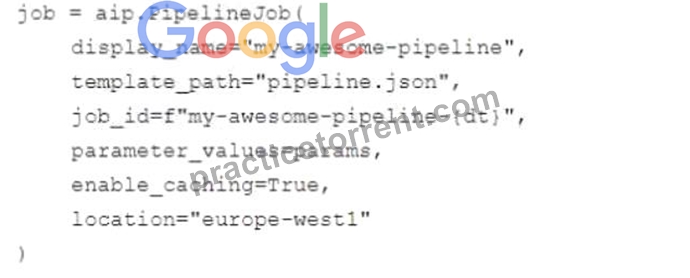
You perform many model iterations by adjusting the code and parameters of the training step. You observe high costs associated with the development, particularly the data export and preprocessing steps. You need to reduce model development costs. What should you do?
- A.

- B.

- C.

- D.

Answer: A
Explanation:
According to the official exam guide1, one of the skills assessed in the exam is to "automate and orchestrate ML pipelines using Cloud Composer". Vertex AI Pipelines2 is a service that allows you to orchestrate your ML workflows using Kubeflow Pipelines SDK v2 or TensorFlow Extended. Vertex AI Pipelines supports execution caching, which means that if you run a pipeline and it reaches a component that has already been run with the same inputs and parameters, the component does not run again. Instead, the component uses the output from the previous run. This can save you time and resources when you are iterating on your pipeline.
Therefore, option A is the best way to reduce model development costs, as it enables execution caching for the data export and preprocessing steps, which are likely to be the same for each model iteration. The other options are not relevant or optimal for this scenario. References:
* Professional ML Engineer Exam Guide
* Vertex AI Pipelines
* Google Professional Machine Learning Certification Exam 2023
* Latest Google Professional Machine Learning Engineer Actual Free Exam Questions
NEW QUESTION # 92
You work at a gaming startup that has several terabytes of structured data in Cloud Storage. This data includes gameplay time data user metadata and game metadat a. You want to build a model that recommends new games to users that requires the least amount of coding. What should you do?
- A. Load the data in BigQuery Use BigQuery ML to train a matrix factorization model.
- B. Read data to a Vertex Al Workbench notebook Use TensorFlow to train a two-tower model.
- C. Read data to a Vertex AI Workbench notebook Use TensorFlow to train a matrix factorization model.
- D. Load the data in BigQuery Use BigQuery ML to tram an Autoencoder model.
Answer: A
Explanation:
BigQuery is a serverless data warehouse that allows you to perform SQL queries on large-scale data. BigQuery ML is a feature of BigQuery that enables you to create and execute machine learning models using standard SQL queries. You can use BigQuery ML to train a matrix factorization model, which is a common technique for recommender systems. Matrix factorization models learn the latent factors that represent the preferences of users and the characteristics of items, and use them to predict the ratings or interactions between users and items. You can use the CREATE MODEL statement to create a matrix factorization model in BigQuery ML, and specify the matrix_factorization option as the model type. You can also use the ML.RECOMMEND function to generate recommendations for new games based on the trained model. This solution requires the least amount of coding, as you only need to write SQL queries to train and use the model. Reference: The answer can be verified from official Google Cloud documentation and resources related to BigQuery and BigQuery ML.
BigQuery ML | Google Cloud
Using matrix factorization | BigQuery ML
ML.RECOMMEND function | BigQuery ML
NEW QUESTION # 93
......
Professional-Machine-Learning-Engineer dumps Free Test Engine Verified By It Certified Experts: https://www.practicetorrent.com/Professional-Machine-Learning-Engineer-practice-exam-torrent.html
View All Professional-Machine-Learning-Engineer Actual Exam Questions, Answers and Explanations for Free: https://drive.google.com/open?id=1mr5mvtKI6gpsBi3JqwPYsBI0VFtyxjhg