


Snowflake SPS-C01 Real Exam Questions Guaranteed Updated Dump from PracticeTorrent
Verified Pass SPS-C01 Exam in First Attempt Guaranteed
NEW QUESTION # 109
Consider a scenario where you're developing a Snowpark stored procedure that accesses sensitive data'. Which of the following strategies, when used together, provide a comprehensive approach to secure this stored procedure and protect the underlying data?
Select all that apply:
- A. Encrypting the stored procedure's code using AES encryption before deployment.
- B. Using 'EXECUTE AS OWNER and granting the 'SELECT privilege on the sensitive data tables to the stored procedure's owner role.
- C. Implementing row-level security policies on the sensitive data tables.
- D. Masking sensitive data within the stored procedure using Snowflake's dynamic data masking policies.
- E. Using 'EXECUTE AS CALLER and relying on the caller's privileges to access the data.
Answer: C,D,E
Explanation:
Row-level security (RLS) ensures that users only see the data they are authorized to see, regardless of how they access it. EXECUTE AS CALLER ensures the procedure runs with the user's privileges, enforcing their existing access controls. Dynamic data masking provides an additional layer of security by masking sensitive data based on defined policies. 'EXECUTE AS OWNER grants the stored procedure access based on the procedure's owner's privileges, potentially bypassing individual user permissions. Stored procedure code encryption isn't supported within Snowflake.
NEW QUESTION # 110
You have created a Python UDTF in Snowpark to process large volumes of image data'. This UDTF resizes each image and extracts certain features from it. The process is memory-intensive and sometimes fails due to Python process exceeding memory limits. You need to optimize this UDTF for memory usage. Which of the following strategies would be MOST effective? (Select TWO)
- A. Use a scalar UDF instead of a UDTF. Scalar UDFs are generally more memory efficient.
- B. Increase the value of 'MAX BATCH SIZE in the Snowpark session configuration to allow the UDTF to process larger batches of images at once.
- C. Utilize a smaller Snowflake warehouse size. Smaller warehouses have less memory per node, which will force the UDTF to process data in smaller chunks.
- D. Implement lazy evaluation and iterators within the UDTF to process images one at a time instead of loading all images into memory at once.
- E. Leverage external packages such as PILIPillow with appropriate image compression techniques to reduce the memory footprint of each image before processing.
Answer: D,E
Explanation:
Lazy evaluation (B) and iterators allow processing data in smaller chunks, reducing memory consumption. Utilizing image compression techniques (D) reduces the memory footprint of each image, allowing more images to be processed within the available memory. Using scalar UDFs would not help and might perform worse. Decreasing the warehouse size would not solve the underlying problem and may make it worse. MAX_BATCH_SIZE determines how many records are sent over to UDF for each batch. It can help increasing performance but decreasing batch sizes might help with memory management, however its dependent on each case.
NEW QUESTION # 111
You are using Snowpark Python to build a data pipeline. You need to version control your Snowpark application and ensure that it is compatible with different Snowflake environments (development, staging, production). Which strategies and tools would be most effective for managing the Snowpark application's code, dependencies, and deployment process?
- A. Copy and paste the Python code between different Snowflake environments as needed, manually installing any required dependencies.
- B. Use a Git repository to manage the Snowpark Python code, a dependency management tool like Poetry or pip to handle dependencies, and a CI/CD pipeline (e.g., using Jenkins or GitLab CI) to automate deployment to different Snowflake environments.
- C. Store the Python code directly in Snowflake stages and use Snowflake's versioning capabilities to manage different versions.
- D. Package all Snowpark code into a single ZIP file and manually upload it to each environment.
- E. Rely solely on Snowflake's built-in Python interpreter and avoid using any external libraries or dependencies to simplify versioning and deployment.
Answer: B
Explanation:
Using a Git repository for version control, a dependency management tool like Poetry or pip, and a CI/CD pipeline is the recommended approach for managing Snowpark applications. This allows for proper version control, dependency management, and automated deployment across different environments. The other options represent less robust and error-prone approaches.
NEW QUESTION # 112
You are working with Snowpark to create a DataFrame from a Python dictionary where keys represent column names and values are lists representing column data'. However, the dictionary contains lists of varying lengths for different columns. You need to create a DataFrame from the Python dictionary but are unsure how to create it. Which approach should you take and why?
- A. DataFrame to a Snowpark DataFrame using 'session.createDataFrame(pandas_df)'. Snowpark does not support creating DataFrames directly from dictionaries with lists of varying lengths. The code will throw an error. So, manually build the logic of combining the lists.
- B. Manually pad all lists in the dictionary with 'None' values until they have the same length. Then, create the DataFrame using 'session.createDataFrame(data)'.
- C. Transform the dictionary into a list of dictionaries or tuples, padding the short lists with 'None' values. Then, define a schema and use 'session.createDataFrame(data, schema=schema)' to create the DataFrame.
- D. Create a Pandas DataFrame from the dictionary first. Pandas handles lists of unequal lengths by filling the shorter lists with NaN. Then, convert the Pandas
- E. Attempt to create the DataFrame directly using 'session.createDataFrame(data)'. Snowpark will automatically pad the shorter lists with 'NULL' values to match the length of the longest list.
Answer: B,C
Explanation:
Options B and E are the most appropriate solutions. Correctness and Rationale: Option B works. The reason is that padding all the lists to the same length will then allow the function to run correctly Correctness and Rationale: Option E also works. The reason is that the transformation to the dictionary to a list or tuple along with the 'session.createDataFrame(data, schema=schemay is also supported. The data types can be forced too to conform to datamodel. Option A is incorrect because it doesn't state an error. Option C, though technically functional by leveraging Pandas, is less efficient than creating Pandas DataFrame since Pandas creates another layer on top of Snowpark Option D is incorrect because Snowpark does support this scenario provided all lists are of equal length, with padding applied.
NEW QUESTION # 113
You have a Snowpark Python UDF that performs sentiment analysis on customer reviews. The UDF relies on a pre-trained machine learning model stored as a file in a Snowflake stage. To enhance security, you want to create a secure UDF. Which of the following steps are necessary to achieve this?
- A. Grant USAGE privilege on the stage containing the model file to the SNOWFLAKE.DATA_GOVERNANCE role.
- B. Wrap the UDF creation in a stored procedure with 'EXECUTE AS CALLER to elevate privileges and ensure model access.
- C. When creating the UDF, specify 'secure=True' in the 'CREATE FUNCTION' statement, and explicitly grant USAGE privilege on the stage containing the model file to the role that executes the UDF using 'GRANT USAGE ON STAGE TO ROLE
- D. Grant READ privilege on the stage containing the model file to the role that owns the secure UDF.
- E. Ensure the function definition specifies a 'context' parameter to pass security context.
Answer: C,D
Explanation:
Secure UDFs require explicit grants to access resources. Granting READ privilege on the stage to the UDF owner ensures access during definition. 'secure=True' makes the UDF secure. 'USAGE ON STAGE must be granted to the role executing the UDF to allow it to read from the stage at runtime. 'SNOWFLAKE.DATA GOVERNANCE' role doesn't automatically grant access, and 'EXECUTE AS CALLER is not directly related to granting access to the model file. 'context' is not a standard parameter for UDF definitions and does not manage security context directly.
NEW QUESTION # 114
You have a Python function that performs complex data transformations, too intricate to express directly in Snowpark SQL. You want to register this as a User-Defined Table Function (UDTF) so that it can be used to expand rows in a Snowpark DataFrame. The UDTF takes two arguments: an ID (integer) and a string. It returns a table with three columns: (integer), (string), and 'timestamp' (timestamp). Which of the following code snippets correctly registers this UDTF, making it available for use within Snowpark?
- A.

- B.

- C.

- D.

- E.

Answer: E
Explanation:
Option C provides the correct way to define and register UDTFs using the class-based approach in Snowpark. It defines the UDTF class with 'process' and methods. returns the schema using 'table' function correctly. Options A and B use the decorator approach, which is valid for simple UDTFs, but it's less flexible than the class-based approach, especially for managing complex state or schema. Option D uses the class-based approach but incorrectly defines the 'output_schema' when registering. Option E has an incorrect definition of return type.
NEW QUESTION # 115
You're using Snowpark in Python and need to execute a complex SQL query. The query involves several joins and aggregations, and you want to optimize its performance. You are using "session.sql(query)' to execute the query. Which of the following strategies, applied before executing 'session.sql(query)' , would likely lead to the most significant performance improvement for a very large dataset?
- A. Create a view of the underlying data source instead of directly querying the table.
- B. Use the method on the DataFrame returned by 'session.sql(queryy.
- C. Convert the SQL query into a series of Snowpark DataFrame operations (e.g., 'groupBy()', 'agg()').
- D. Ensure that the SQL query includes appropriate comments to improve readability.
- E. Reduce the size of the data by filtering the DataFrame returned by 'session.sql(queryy using 'where()' before executing any further operations.
Answer: C
Explanation:
Option A provides the most significant improvement because Snowpark DataFrame operations allow Snowflake's query optimizer to leverage pushdown optimizations. When you express your logic as DataFrame operations, Snowpark translates these into SQL that is specifically tailored for Snowflake's engine. This gives Snowflake more control over the execution plan compared to simply passing in a pre-written SQL query via 'session.sql(queryy. DataFrame operations allow the query optimizer to push down operations such as filters and aggregations to the data source, significantly reducing the amount of data transferred and processed. Option B is incorrect because comments only improve readability, not performance. Option C, , can help if the DataFrame is used multiple times, but it doesn't address the initial optimization of the query itself. Option D could help, but converting to DataFrame operations provides more comprehensive optimization. Option E can assist, but often DataFrame creation and optimal query plan generation can be better using Option A.
NEW QUESTION # 116
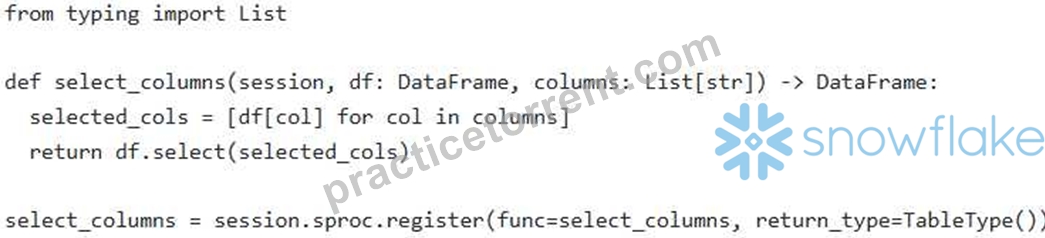
You have a Snowpark DataFrame containing customer data'. You need to create a stored procedure that accepts the DataFrame and a list of column names as input and returns a new DataFrame containing only the specified columns. Which of the following approaches correctly implement this functionality and handles data types effectively (Select all that apply)?
- A.
- B.

- C.

- D.

- E.

Answer: A,E
Explanation:
Options B and E are correct. Option B correctly registers the function 'select_columnS as a stored procedure using "session.sproc.register'. Option E properly constructs the DataFrame by dynamically selecting columns by using 'df[col]'. Option A although syntactically correct may not perform as expected. Option C is incorrect because it attempts to use 'ArrayType' for a standard Python List, which is incompatible. Option D uses columns: str' which makes column as Tuple object instead of List object.
NEW QUESTION # 117
You have created a Snowpark Python UDF named to apply discounts based on customer purchase history. You now need to modify the UDF to accept an additional parameter for promotional codes. However, direct modification of the code on stage is restricted. How can you alter this UDF using SQL, assuming the existing UDF definition resides in the 'mydb.public' schema?
- A. Use 'CREATE OR REPLACE FUNCTION mydb.public.calculate_discount(order_total DOUBLE, customer_segment STRING, promo_code STRING) RETURNS DOUBLE LANGUAGE PYTHON ..: with the updated UDF definition.
- B. Use 'ALTER FUNCTION mydb.public.calculate_discount RENAME TO followed by creating a new UDF with the updated code and original name.
- C. Snowflake does not allow modifying UDFs directly using SQL. You must redeploy the entire Snowpark application.
- D. Use ALTER FUNCTION mydb.public.calculate_discount MODIFY AS with the new Python code block.
- E. Use ALTER FUNCTION mydb.public.calculate_discount ADD PARAMETER promo_code STRING;' followed by 'ALTER FUNCTION mydb.public.calculate_discount SET BODY = 'new python code'; '
Answer: A
Explanation:
'CREATE OR REPLACE FUNCTION' is the correct SQL command to modify an existing UDF. It replaces the old definition with the new one, effectively altering the UDF's parameters and code. Renaming (option A) requires creating a new function anyway. 'ALTER FUNCTION MODIFY AS' is invalid syntax (option C). While redeploying is an option, 'CREATE OR REPLACE FUNCTION' is more efficient (option D). There is no ' ALTER FUNCTION ADD PARAMETER or 'ALTER FUNCTION SET BODY (option E) SQL syntax available for UDF modification.
NEW QUESTION # 118
You are working with a Snowpark DataFrame 'transactions df that contains customer transaction data'. This data includes a 'transaction amount' column and a 'transaction date' column. You need to create a new feature called 'is weekend transaction' that indicates whether a transaction occurred on a weekend (Saturday or Sunday). Furthermore, some 'transaction_date' values are missing. You want to impute the missing dates with the mode (most frequent date) before determining if the transaction occurred on a weekend. Which of the following steps, when combined, provide the correct and most efficient approach to achieve this?
- A. 1. Calculate the mode of the 'transaction_date' column. 2. Filter all rows where 'transaction_date' is null and load that data into a temporary table. 3. Update all rows in original 'transactions_df from temporary table. 4. Create a UDF that takes a date as input and returns True if it's a weekend (Saturday or Sunday), False otherwise. 5. Apply the UDF to the 'transaction_date' column to create the column.
- B. 1. Calculate the mode of the 'transaction_date' column using Snowpark functions. 2. Fill the missing values in the 'transaction_date' column with the calculated mode using 3. Create a UDF using datetime library that takes a date as input and returns True if it's a weekend (Saturday or Sunday), False otherwise. 4. Apply the UDF to the 'transaction_date' column to create the column.
- C. 1. Replace the null values in 'transaction_date' column with a constant string like '1900-01-01'.2. Create a UDF that takes a date as input and returns True if it's a weekend (Saturday or Sunday), False otherwise. 3. Apply the UDF to the 'transaction_dates column to create the column. 4. After applying the UDF convert back the replaced values in transaction_date to null.
- D. 1. Calculate the mode of the 'transaction_date' column. 2. Fill the missing values in the 'transaction_date' column with the calculated mode. 3. Create a UDF that takes a date as input and returns True if it's a weekend (Saturday or Sunday), False otherwise. 4. Apply the UDF to the 'transaction_date' column to create the 'is weekend transaction' column.
- E. 1. Calculate the mode of the 'transaction_date' column using Snowpark functions. 2. Fill the missing values in the 'transaction_date' column with the calculated mode using 'fillna()'. 3. Use the 'dayofweek' function to determine the day of the week and create using a 'when' condition.
Answer: E
Explanation:
Option B is the most efficient and utilizes Snowpark's built-in capabilities. It calculates the mode using Snowpark's aggregation functions, fills missing values using and leverages the function to determine weekend status without the need for a UDF. Option A creates a UDF which is less efficient than using a built-in function. Option C replaces with an arbitary string which is bad as its hardcoding and not efficient, after filling the value a UDF is made which is not efficient as well, Also after that the data has to converted back, thus option C is not correct. Options D is more complex as it utilizes temporary table which is not efficient. Option E create a UDF when snowpark provides readily available functions. so its less efficient.
NEW QUESTION # 119
You are using Snowflake Notebooks to develop a Snowpark application and want to leverage a custom Python library that is not available in the default environment. What steps are necessary to make this library available within your Snowflake Notebook?
- A. Upload the Python library's ' .py' file directly to the Snowflake stage and import it using 'import sys; sys.path.append("); import
- B. Install the library directly within the Snowflake Notebook using '!pip install
- C. Install the library using pip in the Snowflake Notebook's terminal and then restart the Snowflake Notebook.
- D. Create a deployment file using setup.py, upload deployment file to stage, and create function
- E. Create a conda environment specification file ('environment.yml') that includes the custom library, upload it to a Snowflake stage, and then create a new environment based on that file when creating or modifying the Snowflake Notebook.
Answer: E
Explanation:
Snowflake Notebooks primarily use conda environment specification files ('environment.yml') (B) to manage dependencies. You specify the required libraries in the 'environment.ymr file, upload it to a stage, and use it when creating or updating the Notebook environment. Uploading raw .pV files (A) might work for simple modules, but lacks dependency management. Using '!pip install' (C and E) directly in the notebook is not the intended way to manage dependencies in Snowflake Notebooks for production scenarios and might not persist across sessions.
NEW QUESTION # 120
You have a DataFrame 'df in Snowpark containing order data, including a VARIANT column named 'order details'. The 'order detailS column contains a nested JSON structure with fields like 'customer id' (always a string), 'items' (an array of item IDs, sometimes numbers, sometimes strings), and 'total amount' (inconsistent data type - sometimes string, sometimes number). You need to perform the following transformations: 1. Extract the "customer_id' and cast it to an integer. 2. Extract the first item ID from the 'items' array, attempting to cast it to an integer, handling potential casting errors. 3. Extract the 'total_amount' and cast it to a decimal (precision 10, scale 2), handling potential casting errors. Which of the following code snippets correctly implements these transformations using Snowpark?
- A.

- B.

- C.

- D.

- E.

Answer: D
Explanation:
Option D correctly implements the required transformations: Since 'customer_id' is always a string, but should be converted to Integer, we can directly cast. is used for to handle cases where the item ID might not be a valid number. 10, is used for 'total_amount' to handle potential casting errors and to cast as decimal with precision 10 and scale 2 Options A, B, C, and E will fail when the values are incorrect data types, they do not perform handle exceptions.
NEW QUESTION # 121
You have a Snowpark Python stored procedure that performs complex data transformations. This stored procedure needs to read data from a large table ('TRANSACTIONS) and write the transformed data to another table PROCESSED TRANSACTIONS'). You want to optimize the performance of this stored procedure by leveraging Snowpark's features for parallel processing. Which of the following approaches can significantly improve the performance of the stored procedure, assuming sufficient warehouse resources are available?
- A. Load the data from 'TRANSACTIONS' table into a temporary table within the stored procedure, then use standard SQL queries on the temporary table for transformations, finally using snowpark DataFrame API to write it back to the 'PROCESSED_TRANSACTIONS' table.
- B. Read the entire 'TRANSACTIONS table into a Pandas DataFrame within the stored procedure and perform the transformations using Pandas functions. Then, write the transformed data back to the table using Snowpark's 'createDataFrame' and 'write' methods.
- C. Use the Snowpark DataFrame API to read the 'TRANSACTIONS' table and apply transformations using vectorized UDFs. Then, use the 'write' method to write the transformed data to the 'PROCESSED TRANSACTIONS' table.
- D. Use Snowflake's standard SQL queries within the stored procedure to read and transform the data. Write the results to the 'PROCESSED TRANSACTIONS table using 'INSERT statements.
- E. Use Snowpark's 'sprocs decorator with appropriate 'packages' and leverage the Snowpark DataFrame API with vectorized UDFs to transform the data. Use 'session.write_pandaS to write the Pandas DataFrame to the 'PROCESSED_TRANSACTIONS' table after the transformation.
Answer: C
Explanation:
Using Snowpark DataFrame API along with vectorized UDFs leverages Snowflake's distributed processing capabilities for parallel execution, greatly enhancing performance. Reading the entire table into a Pandas DataFrame (Option B) limits parallelism and can lead to memory issues with large datasets. While SQL queries (Option C) work, they don't fully leverage Snowpark's optimized data transfer and processing. Option D refers to 'session.write_pandas' which isn't accurate in the context of writing transformed Snowpark data to Snowflake tables within the stored procedure. Using a temporary table and standard SQL queries, while functional, doesn't harness the full potential of Snowpark's distributed execution engine as effectively as using the DataFrame API directly (Option E).
NEW QUESTION # 122
Consider the following Snowpark Python code snippet for creating a stored procedure:
What is the PRIMARY reason for explicitly defining 'input_types' and during the stored procedure registration?
- A. To enable the stored procedure to be called from other programming languages besides Python.
- B. To allow Snowflake to automatically generate documentation for the stored procedure's input and output types.
- C. To improve the performance of the stored procedure by enabling compile-time optimizations.
- D. To ensure data type safety and schema validation during deployment and execution, preventing unexpected runtime errors due to type mismatches between the stored procedure and the calling environment.
- E. To allow Snowsight to correctly display the stored procedure's metadata, making it easier for users to understand its functionality.
Answer: D
NEW QUESTION # 123
You have a Snowflake table 'orders_json' with a VARIANT column named "order details'. This column contains JSON objects, and one of the fields within these objects is an array called 'items'. You need to use Snowpark to flatten the 'items' array into rows, extracting the 'item_id' , 'item_name' , and 'quantity' from each item in the array. Which of the following Snowpark code snippets will correctly achieve this, assuming 'df is a DataFrame representing 'orders_json'?
- A.

- B.

- C.

- D.

- E.

Answer: D
Explanation:
Option E is correct because it first extracts the 'items' array into a new column 'items_array' using 'withColumn' . Then, it uses the explode' function to flatten the array into rows, aliasing the exploded column as 'item'. Finally, it selects the desired fields 'item_name' , quantity') from the 'item' column using 'getltem'.
NEW QUESTION # 124
A data engineering team has deployed a Snowpark Python application that reads data from a Snowflake table, performs several complex transformations using Snowpark DataFrames, and writes the results back to another Snowflake table. The team is concerned about the cost associated with the virtual warehouse used by the Snowpark application. Which of the following strategies would be MOST effective in minimizing the virtual warehouse costs while maintaining acceptable performance?
- A. Use serverless compute service when possible to avoid managing warehouse.
- B. Set the AUTO SUSPEND parameter of the virtual warehouse to the shortest possible duration (e.g., 60 seconds).
- C. Implement a resource monitor to limit the credit consumption of the virtual warehouse used by the Snowpark application.
- D. Use the smallest possible virtual warehouse size (e.g., X-SMALL) and rely on Snowflake's automatic scaling capabilities to handle workload spikes.
- E. Optimize the Snowpark code to minimize data shuffling and reduce the amount of data processed.
Answer: A,C,E
Explanation:
Implementing a resource monitor (C) provides a hard limit on credit consumption, preventing unexpected cost overruns. Optimizing the Snowpark code (D) to reduce data shuffling and processed data directly reduces resource usage. Using serverless compute (E) can reduce warehouse management overhead and potentially lower costs, especially for intermittent workloads. Setting a very short AUTO_SUSPEND (A) can lead to frequent warehouse starts, increasing costs due to warm-up time. Using the smallest warehouse size (B) might not provide acceptable performance and could lead to longer processing times, potentially increasing costs overall. Code optimization and resource monitoring are critical for cost control.
NEW QUESTION # 125
You are working with a Snowpark DataFrame 'sales_data' containing sales transactions. The DataFrame includes columns 'transaction_id' (STRING), 'product_id' (IN T), 'sale_date' (DATE), and 'sale_amount' (DOUBLE). You need to calculate the total sales amount for each product on a daily basis. Furthermore, you want to filter out any days where the total sales amount for a specific product is less than $50. Which of the following code snippets correctly achieves this using Snowpark Python?
- A.

- B.

- C.

- D.

- E.

Answer: B,E
Explanation:
Options A and B are correct. Both first group the data by 'product_id' and 'sale_date' and calculate the sum of 'sale_amount' for each group. They then filter the results to include only those rows where 'total_sales' is greater than 50. 'filter' and 'where' are interchangable. C would be invalid snowpark as you use 'having' after group_by. Option D and E would also be valid if the prompt asked for all days with a sale amount equal to greater than $50 not greater.
NEW QUESTION # 126
You are tasked with automating the creation of Snowpark sessions using key pair authentication for multiple users. You have a function that retrieves connection parameters (account, user, private key, etc.) for each user from a secure configuration file. The private keys are stored in PEM format. However, some users' private keys are password-protected. Which of the following approaches ensures the secure and correct establishment of Snowpark sessions for all users, including those with password-protected private keys? Assume get_user config(username)' retrieves the user's configuration, including the private key and password (if any).
- A. Store the password for each user's private key in a separate, encrypted file and retrieve it during session creation.
- B. Attempt to establish a session without a password. If it fails, prompt the user for the password and retry the session creation using the provided password. Store the password temporarily in memory.
- C. Require all users to remove the password protection from their private keys to simplify the session creation process.
- D.

- E.

Answer: E
Explanation:
Option C is the most secure and correct approach. It handles both password-protected and non-password-protected private keys gracefully using the 'cryptography' library, without storing passwords in memory or requiring users to compromise their security. It attempts to load the private key with the password (if provided), and if no password is provided, it defaults to 'None'. Options A and D have security vulnerabilities associated with storing or prompting for passwords. Option B forces users to weaken security. Option E doesn't consider password protected private keys.
NEW QUESTION # 127
You are developing a Snowpark application using Visual Studio Code and the Snowflake VS Code extension. You want to configure the extension to automatically detect and use a specific Anaconda environment for your Snowpark development. Assuming you have already created an Anaconda environment named 'snowpark_env', which configuration setting in the VS Code settings.json file would correctly specify the Python path for the Snowflake extension?
- A. "python.pythonPath": "Ipath/to/anaconda3/envs/snowpark_env/bin/python"
- B. "snowsql.pythonPath": "/path/to/anaconda3/envs/snowpark_env/bin/python"
- C. "snowflake.snowpark.pythonPath": "Ipath/to/anaconda3/envs/snowpark_env/bin/python"
- D. "python.defaultlnterpreterPath": "Ipath/to/anaconda3/envs/snowpark_env/bin/python"
- E. "snowflake.python.defaultlnterpreterPath": "Ipath/to/anaconda3/envs/snowpark_env/bin/python"
Answer: D
Explanation:
Option D is the correct configuration setting. The 'python.defaultlnterpreterPath' setting in VS Code's 'settings.json' file is used to specify the Python interpreter path that VS Code should use for all Python-related tasks, including running and debugging Snowpark applications. Options A and C are incorrect because the Snowflake extension uses standard VS Code Python settings. Option E is for SnowSQL and not directly related to Snowpark Python development within VS Code. The path needs to point to the python executable inside your conda enviornment.
NEW QUESTION # 128
You are tasked with creating a Snowpark stored procedure that needs to access a secret stored in Snowflake's Secret Managen The secret contains credentials required to connect to an external API. Which of the following steps are necessary to correctly and securely access and use the secret within your Snowpark stored procedure? (Select all that apply)
- A. Use the method within the stored procedure to retrieve the secret value.
- B. Store the secret value directly in the stored procedure's code as a global variable.
- C. Create a UDF that exposes the secret and call that UDF in the stored procedure.
- D. Ensure that the stored procedure is created with the 'EXECUTE AS CALLER clause.
- E. Grant the USAGE privilege on the secret to the role that will execute the stored procedure.
Answer: A,D,E
Explanation:
Options A, B, and D are the correct steps. First, the executing role needs 'USAGE on the secret. Second, session.get_secret('secret_name')' is the correct method to access the secret value within the procedure. The stored procedure must be created with EXECUTE AS CALLER for it to use the caller's permissions (which include access to the secret). Option C is incorrect because storing secrets directly in the code is a security risk. Option E is incorrect because Creating a UDF is unneccessary, stored procedures are capable of accessing secret manager directly with provided right access.
NEW QUESTION # 129
......
Download Real Snowflake SPS-C01 Exam Dumps Test Engine Exam Questions: https://www.practicetorrent.com/SPS-C01-practice-exam-torrent.html
Free SPS-C01 Sample Questions and 100% Cover Real Exam Questions: https://drive.google.com/open?id=1SSLCIEaOggh7uSjf1xdKYLZhU1So8Zqe