


VMware 2V0-17.25 Exam Prep Guide: Prep guide for the 2V0-17.25 Exam
2025 New Preparation Guide of VMware 2V0-17.25 Exam
NEW QUESTION # 111
In VMware storage design for a vSphere environment, which of the following are commonly used datastore types?
- A. NFS datastores over IP network
- B. CIFS shares for hosting VM disks
- C. vSAN datastores across cluster nodes
- D. VMFS datastores on block storage
Answer: A,C,D
Explanation:
VMware supports VMFS (on block storage), NFS (file-based), and vSAN (distributed storage). CIFS (option C) is typically not used to host VMware virtual disks.
NEW QUESTION # 112
DRAG DROP
Arrange the steps in the correct order to resolve host connectivity issues.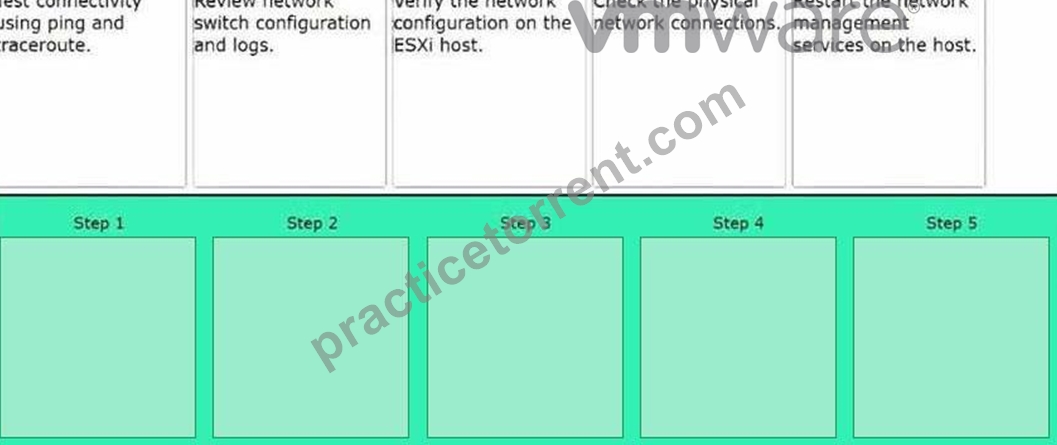
Answer:
Explanation: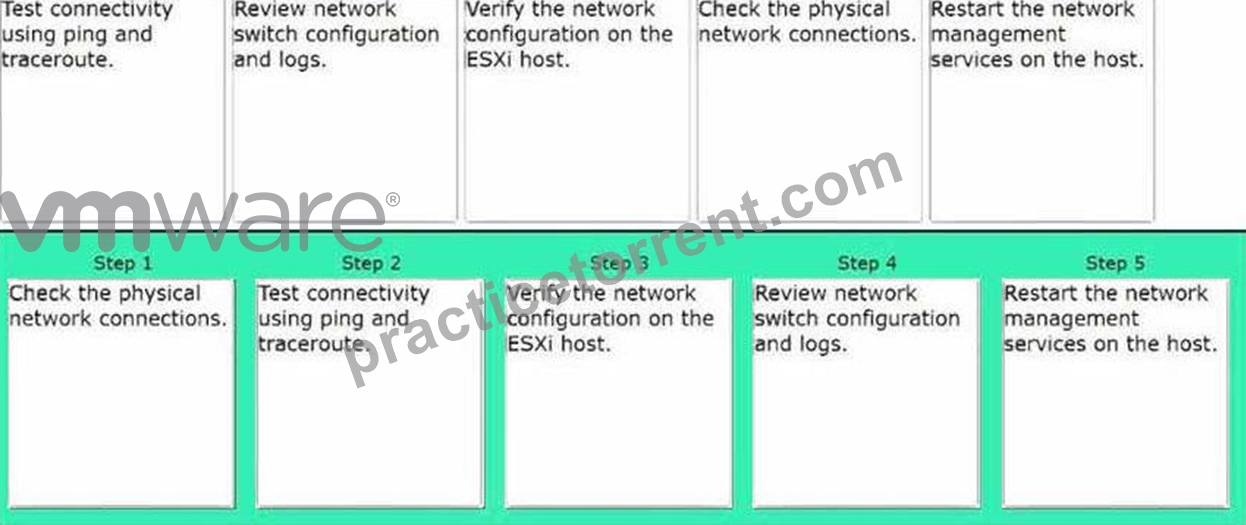
NEW QUESTION # 113
A vCenter Server is showing high CPU usage due to large inventory and frequent tasks.
Which approach can alleviate performance issues?
- A. Disable DRS and HA on all clusters
- B. Create additional vCenter Servers with Enhanced Linked Mode
- C. Increase vCenter resource allocation or place it on a faster datastore
- D. Remove all resource pools from the environment
Answer: C
Explanation:
vCenter might need additional CPU, memory, or faster storage. Disabling DRS/HA (A) or removing resource pools (C) undermines cluster functionality. While multiple vCenters (D) could help in extremely large environments, the more direct approach is usually allocating more resources or moving to faster storage.
NEW QUESTION # 114
Which option should be chosen when placing a vSAN host into maintenance mode to ensure all data remains accessible during maintenance, while minimizing the time required to complete the operation?
- A. Ensure Accessibility
- B. No Data Migration
- C. Quick Migration
- D. Full Data Migration
Answer: A
Explanation:
When placing a vSAN host into maintenance mode, choosing "Ensure Accessibility" ensures that all data remains accessible during the maintenance operation. It moves data off the host only if necessary, prioritizing accessibility while minimizing downtime. This option is designed to minimize the time required to complete the operation compared to "Full Data Migration."
NEW QUESTION # 115
An administrator is tasked with troubleshooting an issue where some VMs are not appearing in the vCenter inventory after a recent migration to a new vSphere environment.
Which two components should the administrator examine to resolve this issue? (Choose two.)
- A. The storage policies applied to the VMs.
- B. The network settings of the new vSphere environment.
- C. The vSphere permissions assigned to the VMs.
- D. The compatibility of the VM hardware version with the new vSphere environment.
- E. The registration status of the VMs in the new vSphere environment.
Answer: D,E
Explanation:
If the hardware version of the virtual machines is incompatible with the new vSphere environment, the VMs may not appear or may fail to register properly. Ensuring compatibility between the VM hardware version and the vSphere environment is essential for successful VM migration.
If the VMs are not correctly registered in the new vSphere environment after migration, they won't show up in the vCenter inventory. Checking the registration status helps to identify if this is the issue.
NEW QUESTION # 116
When planning to migrate from an external Platform Services Controller (PSC) architecture to an embedded PSC in vCenter Server Appliance (VCSA), which critical step must be performed first to ensure a supported migration path?
- A. Detaching all ESXi hosts from vCenter prior to migration
- B. Placing the PSC in Maintenance Mode
- C. Confirming that the vCenter and PSC are at the same version and build
- D. Adding an extra vNIC to the PSC for data replication
Answer: C
Explanation:
The external PSC and vCenter must match in version/build before an embedded migration. Having them mismatched can lead to migration failure. Maintenance Mode (C) doesn't apply to PSC, and removing hosts first (D) isn't a requirement.
NEW QUESTION # 117
Which considerations are important when configuring vSphere for HPC (High-Performance Computing) workloads?
- A. Minimizing network latency with dedicated NICs or RDMA support
- B. Configuring ephemeral port binding for better HPC cluster security
- C. Using CPU affinity to pin critical workloads to specific cores
- D. Disabling Hyper-Threading in the BIOS for better CPU isolation
Answer: A,C,D
Explanation:
HPC workloads often benefit from precise CPU scheduling (affinity), disabling Hyper-Threading for isolation, and low-latency networking. Ephemeral port binding (C) is not a typical HPC requirement.
NEW QUESTION # 118
An alert in SDDC Manager indicates that the health status of the vSAN cluster is degraded.
Which tool within VMware Cloud Foundation should be used to gather detailed logs and perform in-depth troubleshooting for the vSAN issues?
- A. Aria Operations for Logs
- B. vCenter Server
- C. Aria Operations for Networks
- D. SDDC Manager
Answer: A
Explanation:
Aria Operations for Logs (formerly known as vRealize Log Insight) is used to collect, analyze, and troubleshoot logs from various components within VMware Cloud Foundation, including the vSAN cluster. It provides detailed insights into the logs, allowing administrators to perform in-depth troubleshooting of issues like degraded health statuses.
NEW QUESTION # 119
What is the first step in downloading the vSphere CLI tools to a developer workstation?
- A. Configure the workstation's network settings to connect to the vSphere environment.
- B. Install a compatible version of Java Runtime Environment
- C. Visit the VMware Downloads page and locate the vSphere CLI tools.
- D. Register the developer workstation with the Active Directory.
Answer: C
Explanation:
The first step in downloading the vSphere CLI tools is to visit the VMware Downloads page, where the vSphere CLI tools are available. From there, you can select the appropriate version for your environment and begin the download process.
NEW QUESTION # 120
A vSphere administrator needs to ensure that VM encryption keys are always stored externally for compliance reasons.
Which component is essential in such a setup?
- A. TPM 2.0 module on each ESXi host
- B. Enhanced vMotion Compatibility (EVC) cluster
- C. KMS (Key Management Server) configured in vCenter
- D. vRealize Operations Manager integration
Answer: C
Explanation:
VM encryption requires a Key Management Server that vCenter integrates with. EVC (A) handles CPU compatibility, TPM (C) supports secure boot and attestation, and vRealize Operations (D) provides performance/monitoring, not encryption key storage.
NEW QUESTION # 121
What is the primary use case for Aria Operations within the VMware Aria Suite?
- A. To enable network virtualization and security.
- B. To automate workload deployments across multiple cloud environments.
- C. To manage and analyze log data from various sources
- D. To provide comprehensive monitoring, analytics, and performance management of the cloud infrastructure.
Answer: D
Explanation:
Aria Operations (formerly known as vRealize Operations) is used to monitor, analyze, and manage the performance of cloud infrastructures, providing insights into capacity, utilization, and overall health. It helps in optimizing resources, preventing downtime, and ensuring the smooth running of applications and services in a VMware environment.
NEW QUESTION # 122
An organization is integrating VMware vCenter with Active Directory (AD) to streamline user authentication. As part of this process, the administrator needs to add AD as an identity source in vCenter.
Which three steps must be performed to successfully add AD as an identity source? (Choose three.)
- A. Configure DNS settings on all ESXi hosts to point to the AD DNS servers.
- B. Select 'Add Identity Source' and choose 'Active Directory (Integrated Windows Authentication)'.
- C. Reboot the vCenter Server to apply the identity source settings.
- D. Enter the Domain Name and the credentials of an AD user with domain join privileges
- E. Navigate to the vCenter Single Sign-On configuration in the vSphere Client.
Answer: B,D,E
Explanation:
When adding AD as an identity source, you need to enter the Domain Name and provide the credentials of an AD user with domain join privileges to authenticate and add the domain.
In the vSphere Client, you need to select 'Add Identity Source' and choose the appropriate method for AD integration, which is typically 'Active Directory (Integrated Windows Authentication)'.
The process to add AD as an identity source is performed under the vCenter Single Sign-On (SSO) configuration in the vSphere Client.
NEW QUESTION # 123
What is the primary purpose of configuring VM storage policies in a VMware vSphere environment?
- A. To enforce specific storage requirements such as performance, availability, and redundancy.
- B. To manage network traffic between VMs.
- C. To automate the backup of virtual machines.
- D. To configure CPU and memory reservations for VMs.
Answer: A
Explanation:
The primary purpose of configuring VM storage policies in a VMware vSphere environment is to enforce specific storage requirements such as performance, availability, and redundancy. These policies help ensure that virtual machines are placed on datastores that meet the desired service levels and characteristics.
NEW QUESTION # 124
The administrator has been tasked with applying asynchronous software updates to the VMware Cloud Foundation (VCF) instance using the VMware Async Patch CLI Tool.
Which four steps would an administrator take to complete the task? (Choose four.)
- A. Download the bundles.
- B. Enable the bundles.
- C. Download the bundles from SDDC Manager.
- D. Apply the patches directly through the Async Patch CLI Tool.
- E. Upload the confirmation to SDDC Manager.
- F. Upload the bundles to SDDC Manager.
- G. Apply the patches through the SDDC Manager UI.
Answer: A,B,F,G
Explanation:
To apply asynchronous software updates to a VMware Cloud Foundation (VCF) instance using the VMware Async Patch CLI Tool, an administrator must follow a specific sequence of steps. The VMware Async Patch CLI Tool is designed to facilitate the application of critical patches to VCF components- such as NSX Manager, vCenter Server, or ESXi-outside the standard release cycle. These patches are then integrated into the SDDC Manager for application.
Based on the provided options and standard practices, the four correct steps are outlined below.
Step 1: Download the Bundles
The process begins with obtaining the necessary patch bundles. These bundles contain the asynchronous updates that need to be applied to the VCF instance. In an offline environment, the administrator downloads the bundles on a separate computer with internet access using the Async Patch CLI Tool (e.g., with a command like --download). In an online environment, the tool can download the bundles directly to the SDDC Manager.
The option B. Download the bundles accurately reflects this initial step, as it is a prerequisite regardless of the environment.
Step 2: Upload the Bundles to SDDC Manager
Once downloaded, the bundles must be made available to the SDDC Manager. In an offline scenario, this involves manually transferring (or uploading) the downloaded bundles from the separate computer to the SDDC Manager appliance. In an online scenario, the Async Patch CLI Tool can automate this upload to the SDDC Manager's internal Lifecycle Management (LCM) repository when enabling the patch.
The option G. Upload the bundles to SDDC Manager represents this critical step, ensuring the bundles are accessible to the system.
Step 3: Enable the Bundles
With the bundles uploaded to the SDDC Manager, the administrator uses the Async Patch CLI Tool to enable the patches. This step involves running a command such as --enableAsyncPatch, which registers the patch bundles with the SDDC Manager and prepares them for application. In an online environment, this command may also handle the download and upload automatically, but since the options separate these actions, "enable" refers specifically to making the patches available within the SDDC Manager.
The option E. Enable the bundles corresponds to this process, aligning with the tool's role in enabling patches for subsequent application.
Step 4: Apply the Patches through the SDDC Manager UI
Finally, the administrator applies the enabled patches to the VCF instance using the SDDC Manager user interface (UI). The Async Patch CLI Tool does not apply the patches directly; instead, it prepares them, and the actual application occurs through the SDDC Manager UI as part of the lifecycle management process. This step ensures the patches are deployed to the target components in a controlled manner.
The option F. Apply the patches through the SDDC Manager UI accurately describes this final action.
Why Not the Other Options?
A). Download the bundles from SDDC Manager: This is incorrect because bundles are typically downloaded from an external source (e.g., VMware's repository) to the SDDC Manager, not the other way around.
C). Upload the confirmation to SDDC Manager: There is no standard process involving "uploading a confirmation" in the async patching workflow, making this option irrelevant.
D). Apply the patches directly through the Async Patch CLI Tool: This is incorrect, as the tool only enables patches; the application is performed via the SDDC Manager UI.
Conclusion
The four steps an administrator would take to apply asynchronous software updates using the VMware Async Patch CLI Tool are:
B). Download the bundles
G). Upload the bundles to SDDC Manager
E). Enable the bundles
F). Apply the patches through the SDDC Manager UI
These steps provide a complete and logical sequence for successfully patching a VCF instance with the Async Patch CLI Tool.
NEW QUESTION # 125
An administrator wants to secure an ESXi host according to best practices.
Which measures should be taken?
- A. Use Active Directory integration or vCenter Single Sign-On for host authentication
- B. Enable Lockdown Mode to limit host-level direct access
- C. Configure a dedicated management network separated from production traffic
- D. Allow all SSH connections by default
Answer: A,B,C
Explanation:
Lockdown Mode (A), dedicated management networks (C), and centralized authentication (D) are recommended for securing hosts. Allowing all SSH connections (B) is a security risk.
NEW QUESTION # 126
An administrator is tasked with ensuring the security of network traffic during the migration of virtual machines (VMs) to prevent any potential interception or tampering of data.
What specific feature or configuration should the administrator enable to safeguard the integrity and confidentiality of the network traffic involved in VM migration?
- A. Encrypted vSphere vMotion
- B. Virtual Machine Encryption
- C. vSphere Distributed Resource Scheduler
- D. vSphere High Availability (HA)
Answer: A
Explanation:
Enabling Encrypted vSphere vMotion encrypts the vMotion network traffic, ensuring the confidentiality and integrity of data as it travels between hosts.
NEW QUESTION # 127
During a network reconfiguration, an administrator wants to minimize disruptions for critical VMs.
Which strategies support minimal downtime?
- A. Disable DRS to prevent any automated host migrations
- B. Use vMotion to move VMs before making major network changes
- C. Schedule maintenance windows for host networking updates
- D. Employ NIC teaming and failover policies
Answer: B,C,D
Explanation:
Migrating VMs off hosts via vMotion (A), scheduling a maintenance window (C), and using NIC teaming (D) for redundancy help minimize downtime. Disabling DRS (B) can be detrimental if loads need rebalancing.
NEW QUESTION # 128
A vSphere administrator has been asked to encrypt data at rest in a software-defined storage environment.
Which native feature can achieve this?
- A. vCenter Alarms
- B. vSphere Replication
- C. vSAN Encryption
- D. EVC
Answer: C
Explanation:
vSAN Encryption is a native feature of vSAN that encrypts data at rest, leveraging a Key Management Server (KMS).
NEW QUESTION # 129
Which three tools could identify and assist with troubleshooting a misconfigured vSAN network?
(Choose three.)
- A. esxcli
- B. Supportability and Serviceability (SoS)
- C. vCheck
- D. Ruby vSphere Console (RVC) commands
- E. vmkping
- F. Direct Console User Interface (DCUI)
Answer: A,D,E
Explanation:
esxcli commands (for example, esxcli network vsan cluster get) can validate and configure vSAN network settings.
vmkping allows you to test VMkernel adapter connectivity on the vSAN network to confirm reachability and MTU correctness.
RVC provides specialized vSAN commands (such as vsan.network_info and health check commands) tailored for diagnosing vSAN network misconfigurations.
NEW QUESTION # 130
DRAG DROP
Put the following steps in the correct order to optimize resource allocation using Aria Operations.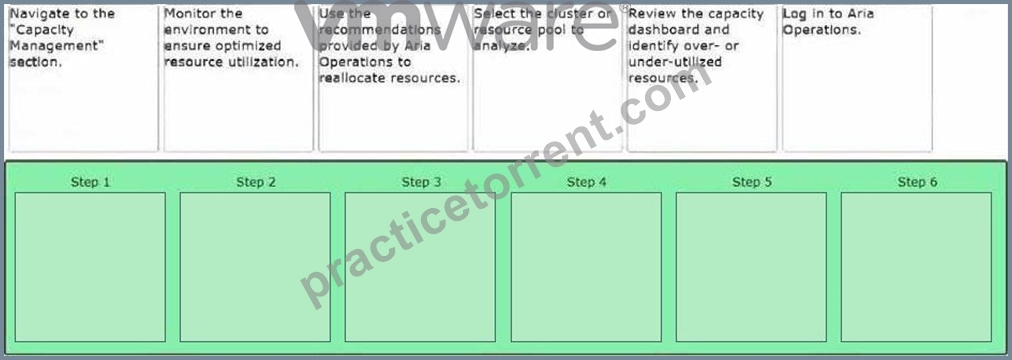
Answer:
Explanation: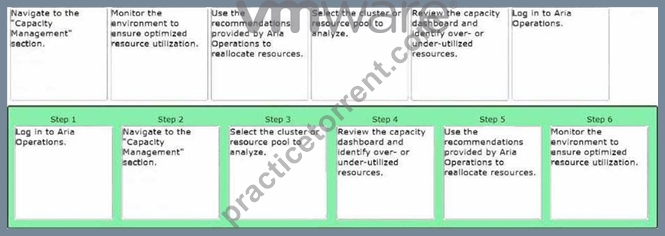
NEW QUESTION # 131
A Cloud Administrator has been tasked with verifying all of the prerequisites are in place prior to deploying VMware Aria Suite Lifecycle.
The following information has been provided for the Aria Suite Lifecycle implementation:
- hostname: lcm
- domain: vcf.company.com
- IP address: 10.0.0.150 /24 -
- IP gateway: 10.0.0.1 -
Which three items must the Cloud Administrator ensure are available prior to deploying VMware Aria Suite Lifecycle? (Choose three.)
- A. Connectivity between Application Virtual Networks, Management Network, and network services (DNS and NTP)
- B. A DNS A Record for lcm.vcf.company.com that points to 10.0.0.150
- C. The IP address for the Standalone Tier 1 Load Balancer for VMware Aria components is prepared
- D. A CA-signed SSL certificate for Aria Suite Lifecycle added to SDDC Manager
- E. A DNS PTR Record for 10.0.0.1 that points to lcm.vcf.company.com
Answer: A,B,C
NEW QUESTION # 132
......
Latest Questions 2V0-17.25 Guide to Prepare Free Practice Tests: https://www.practicetorrent.com/2V0-17.25-practice-exam-torrent.html
2V0-17.25 Practice Exam - 275 Unique Questions: https://drive.google.com/open?id=1iKykosVTBm87jTEYg1wtvbK9IVtWjUYX