


[Jan-2025] MS-700 Pre-Exam Practice Tests | Exam Questions and Answers for Microsoft 365 Certified Study Guide
Managing Microsoft Teams Certification Sample Questions
NEW QUESTION # 125
Note: This question is part of a series of questions that present the same scenario. Each question in the
series contains a unique solution that might meet the stated goals. Some question sets might have more
than one correct solution, while others might not have a correct solution.
After you answer a question in this section, you will NOT be able to return to it. As a result, these
questions will not appear in the review screen.
You company has a Microsoft 365 subscription and a Virtual Desktop Infrastructure (VDI) solution.
The company's Microsoft Teams upgrade policy is set to Teams only coexistence mode.
You deploy the Microsoft Installer (MSI) package for Microsoft Teams to the VDI solution.
Several months later, users of the VDI solution report that their workstation is missing several new Microsoft
Teams features.
You need to ensure that the VDI solution users can use the new Microsoft Teams features.
Solution: You uninstall the Microsoft Teams MSI package, and then reinstall a new Microsoft Teams MSI
package.
Does this meet the goal?
- A. Yes
- B. No
Answer: A
Explanation:
Reference:
https://docs.microsoft.com/en-us/microsoftteams/teams-client-update
https://docs.microsoft.com/en-us/microsoftteams/teams-for-vdi#install-teams-on-vdi
NEW QUESTION # 126
Your company has a Microsoft 365 subscription.
From the Microsoft Teams client, you review the teams shown in the exhibit. (Click the Exhibit tab.)
Members of the Retail team report that they cannot create channels.
You need to ensure that the Retail team members can create channels.
Which two actions should you perform? Each correct answer presents a complete solution.
NOTE: Each correct selection is worth one point.
- A. Instruct the Retail team owner to restore the team by using the Microsoft Teams client.
- B. From the Microsoft Teams client, promote all the Retail team members to an owner role.
- C. From the Microsoft Teams admin center, unarchive the Retail team.
- D. From the Azure Active Directory admin center, change the membership type of the Office 365 group for the Retail team to Assigned.
- E. From PowerShell, modify the information barrier policy.
Answer: A,C
Explanation:
Explanation
https://support.microsoft.com/en-us/office/archive-or-restore-a-team-dc161cfd-b328-440f-974b-5da5bd98b5a7
NEW QUESTION # 127
You have a Microsoft Office 365 subscription named contoso.com.
You need to create the Microsoft Teams teams shown in the following table.
What should you configure each team? To answer, drag the appropriate team types to the correct teams. Each team type may be used once, more than once, or not at all. You may need to drag the split bar between panes or scroll to view content.
NOTE: Each correct selection is worth one point.
Answer:
Explanation:
Reference:
https://docs.microsoft.com/en-us/microsoftteams/teams-channels-overview
NEW QUESTION # 128
You have a Microsoft 365 subscription that uses Microsoft Teams and contains the groups shown in the
following table.
You create a new team named Project1.
Which groups can be added to Project1?
- A. Group1 and Group3 only
- B. Group3 only
- C. Group1. Group2. and Group3
- D. Group1 only
- E. Group2 only
Answer: B
Explanation:
Explanation
Maximum size of distribution list, security group or Office 365 group that can be imported in to a team: 3,500.
Reference:
https://docs.microsoft.com/en-us/microsoftteams/limits-specifications-teams
NEW QUESTION # 129
You have a Microsoft 365 subscription.
You need to create a new Microsoft Teams team named Human Resources that meets the following requirements:
All join requests must be approved by an owner of the team.
The URL for the Microsoft SharePoint Online site of the team must be /teams/HR.
Two users named [email protected] and [email protected] must be assigned as team owners.
How should you complete the PowerShell command? To answer, select the appropriate options in the answer area.
NOTE: Each correct selection is worth one point.
Answer:
Explanation:
Explanation
Reference:
https://docs.microsoft.com/en-us/powershell/module/teams/new-team?view=teams-ps
https://docs.microsoft.com/en-us/powershell/module/teams/add-teamuser?view=teams-ps
NEW QUESTION # 130
During the pilot project, you review the global policies in the Microsoft Teams admin center.
Contoso has a global meeting policy configured as shown in the following exhibit.
Contoso has a global live events policy configured as shown in the following exhibit.
For each of the following statements, select Yes if the statement is true. Otherwise, select No.
NOTE: Each correct selection is worth one point.
Answer:
Explanation:
Explanation
NEW QUESTION # 131
Your company has a Microsoft 365 subscription.
You need to prevent guest users from creating or updating channels.
How should you complete the PowerShell script? To answer, drag the appropriate options to the correct targets. Each option may be used once, more than once, or not at all. You may need to drag the split bar between panes or scroll to view content.
NOTE: Each correct selection is worth one point.
Answer:
Explanation:
Explanation:
Reference:
https://docs.microsoft.com/en-us/powershell/module/teams/get-team?view=teams-ps
https://docs.microsoft.com/en-us/powershell/module/teams/set-team?view=teams-ps
NEW QUESTION # 132
You have a Microsoft 365 E5 subscription that uses Microsoft Teams and contains the resources shown in the following table
You need to configure the subscription to meet the following requirements:
* App1 must be pinned only to the Teams desktop client of the users in Group1.
* App2 must be pinned only to the learns desktop client of the users in Groups.
What should you do in the Microsoft Teams admin center?
- A. Create app permission policies.
- B. Modify the global (Org-wide default) app permission policy.
- C. Modify the global (Org-wide default] app setup policy.
- D. Create app setup policies.
Answer: D
NEW QUESTION # 133
Task 11
You need to restrict external Teams communication for both calling and personal chat to only organizational users that use the microsoft.com domain.
Answer:
Explanation:
To restrict external Teams communication for both calling and personal chat to only organizational users that use the microsoft.com domain, you need to use the Teams admin center to configure the external access settings. Here are the steps to follow:
* Sign in to the Teams admin center with your Microsoft 365 username and password.
* In the left navigation, go to Org-wide settings > External access.
* Under External access, turn on the toggle for Users can communicate with other Skype for Business and Teams users.
* Under Cross-tenant access settings, click Manage settings.
* In the Cross-tenant access settings pane, under Calling and chat, select Allow specific domains and then enter microsoft.com in the box below. This will allow your users to communicate with Microsoft users via calling and chat.
* Click Save.
Note: You also need to make sure that microsoft.com has configured their external access settings to allow communication with your domain. See Communicate with users from other organizations for more details.
NEW QUESTION # 134
You have a Microsoft Office 365 subscription that contains a user named User1.
You need to ensure that User1 can view Usage reports in the Microsoft Teams admin center; The solution must use the principle of least privilege.
Which role should you assign to User'?
- A. Teams Administrator
- B. Global administrator
- C. Teams Communication support specialist
- D. Global reader
Answer: D
Explanation:
https://docs.microsoft.com/en-us/microsoft-365/admin/add-users/about-admin-roles?view=o365-worldwide
NEW QUESTION # 135
Note: This question is part of a series of questions that present the same scenario. Each question in the series contains a unique solution that might meet the stated goals. Some question sets might have more than one correct solution, while others might not have a correct solution.
After you answer a question in this section, you will NOT be able to return to it. As a result, these questions will not appear in the review screen.
You have a Microsoft 365 subscription that contains several Microsoft SharePoint Online sites.
You need to ensure that the content stored in a SharePoint modern team site named Sales is available from Microsoft Teams. The solution must ensure that when a new channel is added to a team, a folder for the channel is created in the Sales site.
Solution: From a team, you add a tab for the Sales site.
Does this meet the goal?
- A. No
- B. Yes
Answer: A
Explanation:
https://support.office.com/en-us/article/Create-a-Microsoft-Team-from-SharePoint-545973b6-c38f-426a-b2b6-16405a561628
NEW QUESTION # 136
You have a Microsoft 365 E5 subscription that uses Microsoft Teams and a hybrid deployment of Microsoft Skype for Business Server.
Coexistence mode in Microsoft Teams is set to Islands.
Coexistence mode is configured for three users named User1, User2, and User3 as shown in the following table.
The Skype for Business user accounts are homed as shown in the following table.
For each of the following statements, select Yes if the statement is true. Otherwise, select No.
NOTE: Each correct selection is worth one point.
Answer:
Explanation: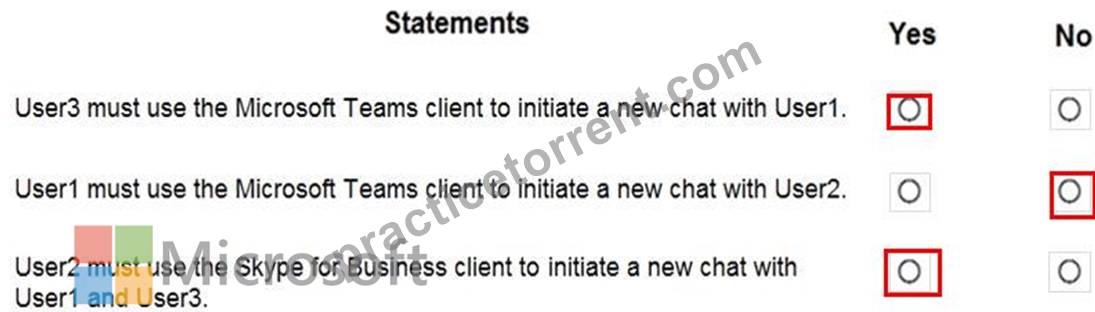
Reference:
https://docs.microsoft.com/en-us/microsoftteams/coexistence-chat-calls-presence
NEW QUESTION # 137
You have a Microsoft 365 E5 subscription that contains a Microsoft Teams team named Sales Team. Sales Team contains the members shown in the following table.
You create a channel named Sales Project and configure the Channel moderation settings as shown in the following exhibit.
For each of the following statements, select Yes if the statement is true. Otherwise, select No.
NOTE: Each correct selection is worth one point.
Answer:
Explanation:
Reference:
https://docs.microsoft.com/en-us/microsoftteams/manage-channel-moderation-in-teams
NEW QUESTION # 138
Note: This question is part of a series of questions that present the same scenario. Each question in the series contains a unique solution that might meet the stated goals. Some question sets might have more than one correct solution, while others might not have a correct solution.
After you answer a question in this section, you will NOT be able to return to it. As a result, these questions will not appear in the review screen.
You have a Microsoft 365 subscription that contains several Microsoft SharePoint Online sites.
You need to ensure that the content stored in a SharePoint modern team site named Sales is available from Microsoft Teams. The solution must ensure that when a new channel is added to a team, a folder for the channel is created in the Sales site.
Solution: From the Microsoft Teams client, you create a new team and select Create from an existing Office
365 group or team.
Does this meet the goal?
- A. Yes
- B. No
Answer: A
Explanation:
Explanation
https://support.microsoft.com/en-us/office/create-a-team-from-an-existing-group-24ec428e-40d7-4a1a-ab87-29b
NEW QUESTION # 139
You are Microsoft Teams administrator for your company.
You have the Org-wide app settings shown in the App Settings exhibit. (Click the App Settings tab.)
The company's global app permission policy is configured as shown in the Permission Policy exhibit. (Click the Permission Policy tab.)
The company's global app setup policy is configured as shown in the Setup Policy exhibit. (Click the Setup Policy tab.)
For each of the following statements, select Yes if the statement is true. Otherwise, select No.
NOTE: Each correct selection is worth one point.
Answer:
Explanation:
Explanation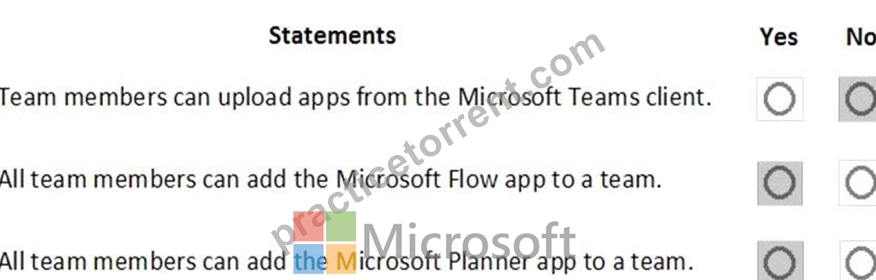
Reference:
https://docs.microsoft.com/en-us/microsoftteams/teams-app-permission-policies
https://office365itpros.com/2019/08/12/using-teams-app-permission-policies/
NEW QUESTION # 140
......
Microsoft Exam Practice Test To Gain Brilliante Result: https://www.practicetorrent.com/MS-700-practice-exam-torrent.html
Tested Material Used To MS-700: https://drive.google.com/open?id=1BClUD-2ywO6ZxeS7dXZPhHfkMluYa0PS